# Utilizando o Arquivo Morto

<span style="color: rgb(0, 0, 0); font-family: Arial; font-size: small;">Com o passar do tempo os arquivos de movimentação do Sistema tornam-se sobrecarregados de informações, o que poderá ocasionar lentidão no sistema. </span>

<span style="color: rgb(0, 0, 0); font-family: Arial; font-size: small;">Para evitar este tipo de problema, os dados de anos anteriores podem ser enviados para o **Arquivo Morto**, liberando o arquivo principal destas informações que não são frequentemente acessadas.</span>

<span style="text-decoration: underline;">**<span style="color: rgb(0, 0, 0); font-family: Arial; font-size: small; text-decoration: underline;">SEMPRE, antes de enviar informações para o Arquivo Morto, faça uma Cópia de Segurança </span>**</span>

<span style="color: rgb(0, 0, 0); font-family: Arial; font-size: small;">  
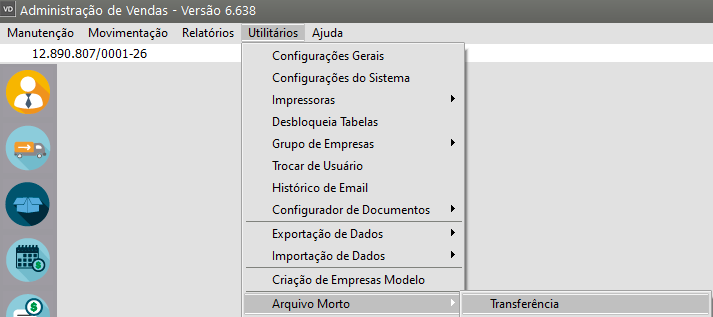
Para enviar informações para o **Arquivo Morto**, acesse o menu **Utilitários&gt;Arquivo Morto&gt;Transferência**</span>

[![image.png](https://autoatendimento.grupoallegus.com.br/uploads/images/gallery/2024-01/scaled-1680-/6NSimage.png)](https://autoatendimento.grupoallegus.com.br/uploads/images/gallery/2024-01/6NSimage.png)

<iframe allowfullscreen="allowfullscreen" height="459" src="https://www.youtube.com/embed/XdrXeV7Iw2E" style="width: 819px; height: 459px;" width="819"></iframe>

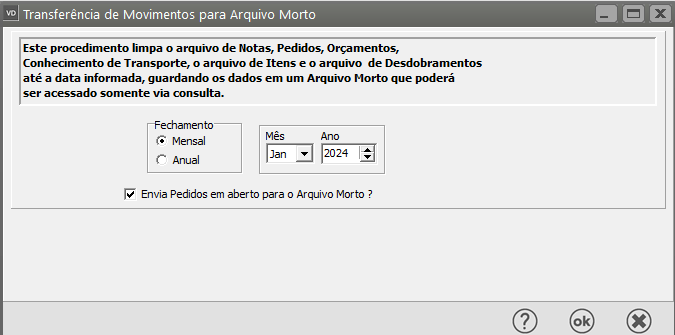
<span style="color: rgb(0, 0, 0); font-family: Arial; font-size: small;">Defina</span><span style="color: rgb(0, 0, 0); font-family: Arial; font-size: small;"> o mês ou ano que deverá ser enviado para o arquivo morto e clique **OK**.</span>

[![image.png](https://autoatendimento.grupoallegus.com.br/uploads/images/gallery/2024-01/scaled-1680-/LXTimage.png)](https://autoatendimento.grupoallegus.com.br/uploads/images/gallery/2024-01/LXTimage.png)

<span style="color: rgb(0, 0, 0); font-family: Arial; font-size: small;">**<u>IMPORTANTE: </u>**</span>

- <span style="color: rgb(0, 0, 0); font-family: Arial; font-size: small;">Lembre-se de que as informações enviadas para o arquivo morto somente podem ser acessadas para <span style="text-decoration: underline;">**consulta**</span>. Então, somente envie períodos antigos, ou seja, para os quais não irão ocorrer mudanças ou não haja a necessidade de impressão de relatórios.</span>

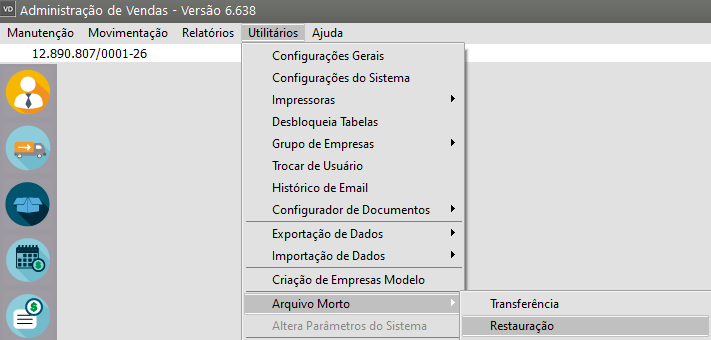
<span style="color: rgb(0, 0, 0); font-family: Arial; font-size: small;">Caso seja enviada alguma informação para o **Arquivo Morto** e haja necessidade de emitir relatórios do período enviado, você poderá Recuperar estes dados, ou seja, retornar os dados do arquivo morto para o arquivo principal. Para isso, acesse o menu **Utilitários&gt;Arquivo Morto&gt;Restauração**</span>

[![image.png](https://autoatendimento.grupoallegus.com.br/uploads/images/gallery/2024-01/scaled-1680-/EHNimage.png)](https://autoatendimento.grupoallegus.com.br/uploads/images/gallery/2024-01/EHNimage.png)

<iframe allowfullscreen="allowfullscreen" height="454" src="https://www.youtube.com/embed/S_mvct3vdiQ" style="width: 810px; height: 454px;" width="810"></iframe>

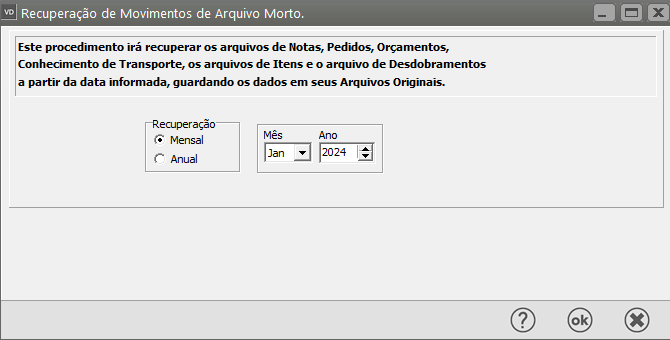
<span style="color: rgb(0, 0, 0); font-family: Arial; font-size: small;">**In**</span><span style="color: rgb(0, 0, 0); font-family: Arial; font-size: small;">forme o período que deseja recuperar.</span>

[![image.png](https://autoatendimento.grupoallegus.com.br/uploads/images/gallery/2024-01/scaled-1680-/BSjimage.png)](https://autoatendimento.grupoallegus.com.br/uploads/images/gallery/2024-01/BSjimage.png)

<span style="color: rgb(0, 0, 0); font-family: Arial; font-size: small;">Existe também a possibilidade de exclusão definitiva de todos os movimentos que estão no arquivo morto.</span>

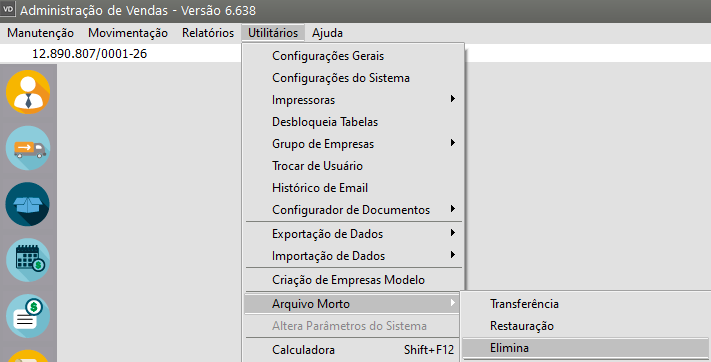
<span style="color: rgb(0, 0, 0); font-family: Arial; font-size: small;">Para isso, acesse o menu **Utilitários&gt;Arquivo Morto&gt;Elimina**</span>

[![image.png](https://autoatendimento.grupoallegus.com.br/uploads/images/gallery/2024-01/scaled-1680-/m4wimage.png)](https://autoatendimento.grupoallegus.com.br/uploads/images/gallery/2024-01/m4wimage.png)

<iframe allowfullscreen="allowfullscreen" height="461" src="https://www.youtube.com/embed/SUV2big0b8c" style="width: 822px; height: 461px;" width="822"></iframe>

<span style="text-decoration: underline;">**<span style="color: rgb(0, 0, 0); font-family: Arial; font-size: small; text-decoration: underline;">Mas ATENÇÃO: </span>**</span>

- <span style="color: rgb(0, 0, 0); font-family: Arial; font-size: small;">Você somente deve excluir os dados que tem certeza que não precisará mais acessar nem tirar relatórios. Esta exclusão é definitiva, **sem possibilidade de recuperação**. </span>
- <span style="color: rgb(0, 0, 0); font-family: Arial; font-size: small;">Recomendamos que os dados somente sejam definitivamente excluídos depois que você executar uma cópia de segurança extra destes dados (ver item </span>[Mantendo a Segurança do Sistema).](https://autoatendimento.grupoallegus.com.br/books/vendasne-documentos-eletronicos/page/mantendo-a-seguranca-do-sistema-copia-de-seguranca)

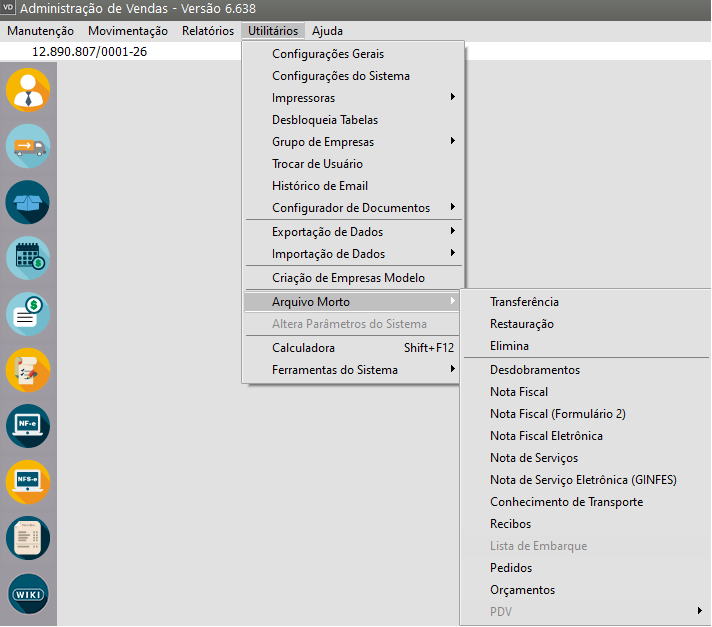
<span style="color: rgb(0, 0, 0); font-family: Arial; font-size: small;">Você poderá ainda realizar consultar e visualizar as informações que foram enviadas para o Arquivo Morto, para isso acesse o menu **Utilitários&gt;Arquivo Morto**</span>

[![image.png](https://autoatendimento.grupoallegus.com.br/uploads/images/gallery/2026-06/scaled-1680-/image.png)](https://autoatendimento.grupoallegus.com.br/uploads/images/gallery/2026-06/image.png)

- <span style="color: rgb(0, 0, 0); font-family: Arial; font-size: small;">Desdobramento</span>

<span style="color: rgb(0, 0, 0); font-family: Arial; font-size: small;"><iframe allowfullscreen="allowfullscreen" height="472" src="https://www.youtube.com/embed/w1e8FS-5dys" style="width: 842px; height: 472px;" width="842"></iframe>

</span>

- <span style="color: rgb(0, 0, 0); font-family: Arial; font-size: small;">Nota Fiscal</span>

<span style="color: rgb(0, 0, 0); font-family: Arial; font-size: small;"><iframe allowfullscreen="allowfullscreen" height="468" src="https://www.youtube.com/embed/fNjiN87qzVA" style="width: 835px; height: 468px;" width="835"></iframe>

</span>

- <span style="color: rgb(0, 0, 0); font-family: Arial; font-size: small;">Nota Fiscal (Formulário 2)</span>

<span style="color: rgb(0, 0, 0); font-family: Arial; font-size: small;"><iframe allowfullscreen="allowfullscreen" height="464" src="https://www.youtube.com/embed/GrZ1F2r9iPw" style="width: 828px; height: 464px;" width="828"></iframe>

</span>

- <span style="color: rgb(0, 0, 0); font-family: Arial; font-size: small;">Nota Fiscal Eletrônica</span>

<iframe allowfullscreen="allowfullscreen" height="468" src="https://www.youtube.com/embed/MEvGx71uFfw" style="width: 835px; height: 468px;" width="835"></iframe>

- <span style="color: rgb(0, 0, 0); font-family: Arial; font-size: small;">Nota de Serviço</span>

<iframe allowfullscreen="allowfullscreen" height="467" src="https://www.youtube.com/embed/TkFqG745Hmc" style="width: 833px; height: 467px;" width="833"></iframe>

- <span style="color: rgb(0, 0, 0); font-family: Arial; font-size: small;">Nota de Serviço Eletrônica (Ginfes)</span>

<iframe allowfullscreen="allowfullscreen" height="464" src="https://www.youtube.com/embed/0KoDRMi0RFs" style="width: 828px; height: 464px;" width="828"></iframe>

- <span style="color: rgb(0, 0, 0); font-family: Arial; font-size: small;">Conhecimento de Transporte</span>

<iframe allowfullscreen="allowfullscreen" height="460" src="https://www.youtube.com/embed/cp-TTrrgSBE" style="width: 820px; height: 460px;" width="820"></iframe>

- <span style="color: rgb(0, 0, 0); font-family: Arial; font-size: small;">Recibos</span>

<iframe allowfullscreen="allowfullscreen" height="455" src="https://www.youtube.com/embed/WIaG8vjcNL4" style="width: 811px; height: 455px;" width="811"></iframe>

- <span style="color: rgb(0, 0, 0); font-family: Arial; font-size: small;">Lista de Embarque</span>

<iframe allowfullscreen="allowfullscreen" height="451" src="https://www.youtube.com/embed/0YESoSR5kfM" style="width: 804px; height: 451px;" width="804"></iframe>

- <span style="color: rgb(0, 0, 0); font-family: Arial; font-size: small;">Pedidos</span>

<iframe allowfullscreen="allowfullscreen" height="446" src="https://www.youtube.com/embed/T9ildy7r1v0" style="width: 795px; height: 446px;" width="795"></iframe>

- <span style="color: rgb(0, 0, 0); font-family: Arial; font-size: small;">Orçamento</span>

<iframe allowfullscreen="allowfullscreen" height="444" src="https://www.youtube.com/embed/xJa5je1RM40" style="width: 792px; height: 444px;" width="792"></iframe>

- <span style="color: rgb(0, 0, 0); font-family: Arial; font-size: small;">PDV</span>

<iframe allowfullscreen="allowfullscreen" height="444" src="https://www.youtube.com/embed/J7NnCtfGawA" style="width: 792px; height: 444px;" width="792"></iframe>

<iframe allowfullscreen="allowfullscreen" height="442" src="https://www.youtube.com/embed/1NHkOesqcSw" style="width: 788px; height: 442px;" width="788"></iframe>

<iframe allowfullscreen="allowfullscreen" height="438" src="https://www.youtube.com/embed/UEi7cPsZVW0" style="width: 781px; height: 438px;" width="781"></iframe>

**<span style="color: rgb(0, 0, 0); font-family: Arial; font-size: small;">Veja também os Itens:</span>**

- <span style="color: rgb(0, 0, 0); font-family: Arial; font-size: small;">[Utilizando o Arquivo Morto](https://autoatendimento.grupoallegus.com.br/books/vendasne-documentos-eletronicos/page/utilizando-o-arquivo-morto)</span>
- [<span style="color: rgb(0, 0, 0); font-family: Arial; font-size: small;">Consulta o Arquivo Morto - Conhecimento de Transporte</span>](https://autoatendimento.grupoallegus.com.br/books/vendasne-documentos-eletronicos/page/consulta-o-arquivo-morto-conhecimento-de-transporte)
- [<span style="color: rgb(0, 0, 0); font-family: Arial; font-size: small;">Consulta o Arquivo Morto - Desdobramentos</span>](https://autoatendimento.grupoallegus.com.br/books/vendasne-documentos-eletronicos/page/consulta-o-arquivo-morto-desdobramentos)
- [<span style="color: rgb(0, 0, 0); font-family: Arial; font-size: small;">Arquivo Morto - Eliminação</span>](https://autoatendimento.grupoallegus.com.br/books/vendasne-documentos-eletronicos/page/arquivo-morto-eliminacao)
- [<span style="color: rgb(0, 0, 0); font-family: Arial; font-size: small;">Consulta o Arquivo Morto - Lista de Embarque</span>](https://autoatendimento.grupoallegus.com.br/books/vendasne-documentos-eletronicos/page/consulta-o-arquivo-morto-lista-de-embarque)
- [<span style="color: rgb(0, 0, 0); font-family: Arial; font-size: small;">Consulta o Arquivo Morto - Nota Fiscal</span>](https://autoatendimento.grupoallegus.com.br/books/vendasne-documentos-eletronicos/page/consulta-o-arquivo-morto-nota-fiscal)
- [<span style="color: rgb(0, 0, 0); font-family: Arial; font-size: small;">Consulta o Arquivo Morto - Nota Fiscal (Formulário 2)</span>](https://autoatendimento.grupoallegus.com.br/books/vendasne-documentos-eletronicos/page/consulta-o-arquivo-morto-nota-fiscal-formulario-2)
- [<span style="color: rgb(0, 0, 0); font-family: Arial; font-size: small;">Consulta o Arquivo Morto - Nota Fiscal Eletrônica</span>](https://autoatendimento.grupoallegus.com.br/books/vendasne-documentos-eletronicos/page/consulta-o-arquivo-morto-nota-fiscal-eletronica)
- [<span style="color: rgb(0, 0, 0); font-family: Arial; font-size: small;">Consulta o Arquivo Morto - Nota de Serviço Eletrônica (GINFES)</span>](https://autoatendimento.grupoallegus.com.br/books/vendasne-documentos-eletronicos/page/consulta-o-arquivo-morto-nota-de-servico-eletronica-ginfes)
- [<span style="color: rgb(0, 0, 0); font-family: Arial; font-size: small;">Consulta o Arquivo Morto - Nota de Serviço</span>](https://autoatendimento.grupoallegus.com.br/books/vendasne-documentos-eletronicos/page/consulta-o-arquivo-morto-nota-de-servico)
- [<span style="color: rgb(0, 0, 0); font-family: Arial; font-size: small;">Consulta o Arquivo Morto - Orçamentos</span>](https://autoatendimento.grupoallegus.com.br/books/vendasne-documentos-eletronicos/page/consulta-o-arquivo-morto-orcamentos)
- [<span style="color: rgb(0, 0, 0); font-family: Arial; font-size: small;">Consulta o Arquivo Morto - PDV (Cupom Fiscal</span>)](https://autoatendimento.grupoallegus.com.br/books/vendasne-documentos-eletronicos/page/consulta-o-arquivo-morto-pdv-cupom-fiscal)
- [Consulta o Arquivo Morto - PDV (Fechamento de Vendas)](https://autoatendimento.grupoallegus.com.br/books/vendasne-documentos-eletronicos/page/consulta-o-arquivo-morto-pdv-fechamento-de-venda)
- [Consulta o Arquivo Morto - PDV (Redução Z)](https://autoatendimento.grupoallegus.com.br/books/vendasne-documentos-eletronicos/page/consulta-o-arquivo-morto-pdv-fechamento-de-venda)
- [Consulta o Arquivo Morto - Pedidos](https://autoatendimento.grupoallegus.com.br/books/vendasne-documentos-eletronicos/page/consulta-o-arquivo-morto-pedidos)
- [Consulta o Arquivo Morto - Recibos](https://autoatendimento.grupoallegus.com.br/books/vendasne-documentos-eletronicos/page/consulta-o-arquivo-morto-recibos)
- [Restauração do Arquivo Morto](https://autoatendimento.grupoallegus.com.br/books/vendasne-documentos-eletronicos/page/restauracao-do-arquivo-morto)
- [Transferência para o Arquivo Morto](https://autoatendimento.grupoallegus.com.br/books/vendasne-documentos-eletronicos/page/transferencia-para-o-arquivo-morto)