# Utilizando Vale Transporte

<iframe allowfullscreen="allowfullscreen" height="469" src="https://www.youtube.com/embed/jxKDx-TB9tg" style="width: 836px; height: 469px;" width="836"></iframe>

<span style="color: rgb(0, 0, 0);">Para desconto dos **6% de [Funcionários](https://autoatendimento.grupoallegus.com.br/books/folha-de-pagamento/page/cadastrando-funcionarios-m0v) que possuem Vale Transporte**, através do **evento e330 (Vale Transporte)** no Hollerith, será necessário que você faça as seguintes configurações:</span>

<span style="text-decoration: underline;">**<span style="color: rgb(0, 0, 0); text-decoration: underline;">a) Cadastro do Transporte e Valor da Passagem</span>**</span>

<span style="color: rgb(0, 0, 0);">Acesse o menu **Manutenção&gt;Funcionários&gt;Tabelas&gt;Transportes**</span>

<span style="color: rgb(0, 0, 0);">**[![image.png](https://autoatendimento.grupoallegus.com.br/uploads/images/gallery/2024-01/scaled-1680-/Gfximage.png)](https://autoatendimento.grupoallegus.com.br/uploads/images/gallery/2024-01/Gfximage.png)**</span>

<span style="color: rgb(0, 0, 0);">Cadastre todos os [transportes](https://autoatendimento.grupoallegus.com.br/books/folha-de-pagamento/page/cadastrando-transporte) que serão utilizados pelos [funcionário](https://autoatendimento.grupoallegus.com.br/books/folha-de-pagamento/page/cadastrando-funcionarios-m0v) e seus respectivos **valores de passagem**</span>

<span style="color: rgb(0, 0, 0);">[![image.png](https://autoatendimento.grupoallegus.com.br/uploads/images/gallery/2024-01/scaled-1680-/sADimage.png)](https://autoatendimento.grupoallegus.com.br/uploads/images/gallery/2024-01/sADimage.png)</span>

<span style="text-decoration: underline;">**<span style="color: rgb(0, 0, 0); text-decoration: underline;">b) Vínculo do Funcionário com o [Transporte Cadastrado](https://autoatendimento.grupoallegus.com.br/books/folha-de-pagamento/page/cadastrando-transporte)</span>**</span>

<span style="color: rgb(0, 0, 0);">Em seguida será necessário realizar o **vínculo dos [funcionários](https://autoatendimento.grupoallegus.com.br/books/folha-de-pagamento/page/cadastrando-funcionarios-m0v) com os transportes utilizados pelo mesmo**</span>

<span style="color: rgb(0, 0, 0);">Lembrando que, você poderá realizar mais do que um vínculo para o mesmo [funcionário](https://autoatendimento.grupoallegus.com.br/books/folha-de-pagamento/page/cadastrando-funcionarios-m0v), caso o mesmo utilize mais do que um [transporte](https://autoatendimento.grupoallegus.com.br/books/folha-de-pagamento/page/cadastrando-transporte) por dia</span>

<span style="color: rgb(0, 0, 0);">Acesse o menu **Manutenção&gt;Funcionários&gt;Vale Transporte &gt;Cadastra**</span>

<span style="color: rgb(0, 0, 0);">[![image.png](https://autoatendimento.grupoallegus.com.br/uploads/images/gallery/2024-01/scaled-1680-/uqMimage.png)](https://autoatendimento.grupoallegus.com.br/uploads/images/gallery/2024-01/uqMimage.png)</span>

<span style="color: rgb(0, 0, 0);">Faça o cadastro do Vale Transporte para cada [Funcionário](https://autoatendimento.grupoallegus.com.br/books/folha-de-pagamento/page/cadastrando-funcionarios-m0v) optante pelo vale transporte</span>

<span style="color: rgb(0, 0, 0);">Informe</span>

- <span style="color: rgb(0, 0, 0);">Mês e Ano de início do cálculo do Vale Transporte</span>
- [<span style="color: rgb(0, 0, 0);">Código do Funcionário;</span>](https://autoatendimento.grupoallegus.com.br/books/folha-de-pagamento/page/cadastrando-funcionarios-m0v)
- <span style="color: rgb(0, 0, 0);">[Código do Transporte](https://autoatendimento.grupoallegus.com.br/books/folha-de-pagamento/page/cadastrando-transporte) (o valor unitário o sistema trará automaticamente, quando você informar o código do transporte );</span>
- <span style="color: rgb(0, 0, 0);">A quantidade de vale transporte utilizado em 1(um) dia normal;</span>
- <span style="color: rgb(0, 0, 0);">A quantidade de vale transporte utilizado em 1(um) sábado.</span>

<span style="color: rgb(0, 0, 0);">Deixe o campo Quantidade total de vales utilizados no mês em branco, esse campo deverá ser preenchido apenas se </span><span style="color: rgb(0, 0, 0);">independente dos dias que cada mês possui, sempre será considerado a mesma quantidade de vale transporte, se for esse o caso, preencha esse campo e deixe os dois campos de quantidade de vales anteriores sem preenchimento</span>

<span style="color: rgb(0, 0, 0);">[![image.png](https://autoatendimento.grupoallegus.com.br/uploads/images/gallery/2024-01/scaled-1680-/pPrimage.png)](https://autoatendimento.grupoallegus.com.br/uploads/images/gallery/2024-01/pPrimage.png) </span>

<p class="callout info"><span style="color: rgb(0, 0, 0);">O campo **'Quantidade total de vales utilizadas no mês'** deverá ser mantido "0", quando você desejar que o Sistema calcule automaticamente (baseado na tabela de DSR, para definir o número de dias normais e sábados) a quantidade de Vale Transporte mensal.</span>  
  
<span style="color: rgb(0, 0, 0);">De acordo com a legislação, o desconto **não deve ultrapassar 6% da remuneração do funcionário,** então, o sistema comparará o valor total dos Vales concedidos ao Funcionário com o valor de 6% da sua remuneração e descontará o menor valor.</span>  
  
<span style="color: rgb(0, 0, 0);">Se a soma do valor total dos passes utilizados for **menor** que os 6% do Salário Base, o Sistema descontará apenas o valor dos passes, caso contrário, descontará do funcionário o limite máximo de 6% normalmente.</span></p>

<span style="text-decoration: underline;"><span style="color: rgb(0, 0, 0); text-decoration: underline;">**c) Inclusão do evento e330 (Vale Transporte) no Hollerith Padrão do Funcionário**</span></span>

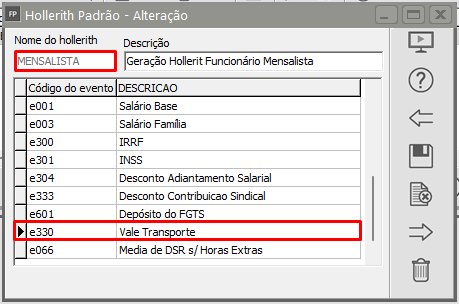
<span style="color: rgb(0, 0, 0);">Verifique o [**Hollerith Padrão**](https://autoatendimento.grupoallegus.com.br/books/folha-de-pagamento/page/padronizando-os-holleriths-0Si) informado no **[cadastro do funcionário](https://autoatendimento.grupoallegus.com.br/books/folha-de-pagamento/page/cadastrando-funcionarios-m0v), na aba "Informações para Cálculo"**, que será utilizado para gerar o Holerith Mensal do [Funcionário](https://autoatendimento.grupoallegus.com.br/books/folha-de-pagamento/page/cadastrando-funcionarios-m0v), pois nesse Hollerith Padrão deve estar cadastrado o evento **e330 - Vale Transporte**, se não estiver, inclua o evento e330 no hollerith Padrão e salve o cadastro.</span>

<span style="color: rgb(0, 0, 0);">[![image.png](https://autoatendimento.grupoallegus.com.br/uploads/images/gallery/2024-01/scaled-1680-/GKBimage.png)](https://autoatendimento.grupoallegus.com.br/uploads/images/gallery/2024-01/GKBimage.png)</span>

<span style="text-decoration: underline;">**<span style="color: rgb(0, 0, 0); text-decoration: underline;">d) Geração do Hollerith</span>**</span>

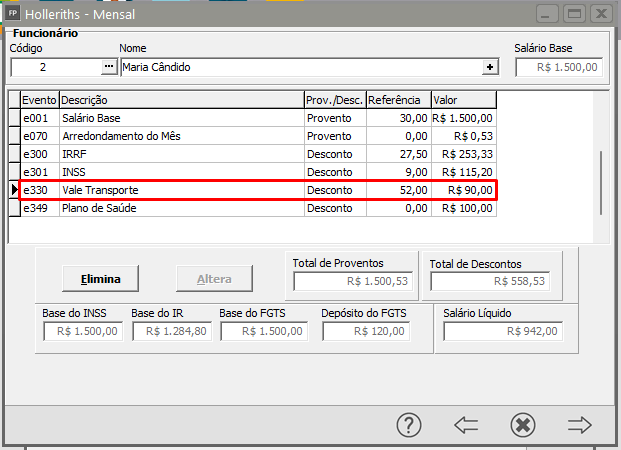
<span style="color: rgb(0, 0, 0);">No momento da[ geração do Hollerith do Funcionário](https://autoatendimento.grupoallegus.com.br/books/folha-de-pagamento/page/gerando-pagamento-mensal-dos-funcionarios), o Sistema irá descontar no evento **e330** automaticamente:</span>

<span style="color: rgb(0, 0, 0);">[![image.png](https://autoatendimento.grupoallegus.com.br/uploads/images/gallery/2024-01/scaled-1680-/G46image.png)](https://autoatendimento.grupoallegus.com.br/uploads/images/gallery/2024-01/G46image.png)</span>

<span style="text-decoration: underline;"><span style="color: rgb(0, 0, 0); text-decoration: underline;">**e)** **Impressão de Recibos e Relatórios**</span></span>

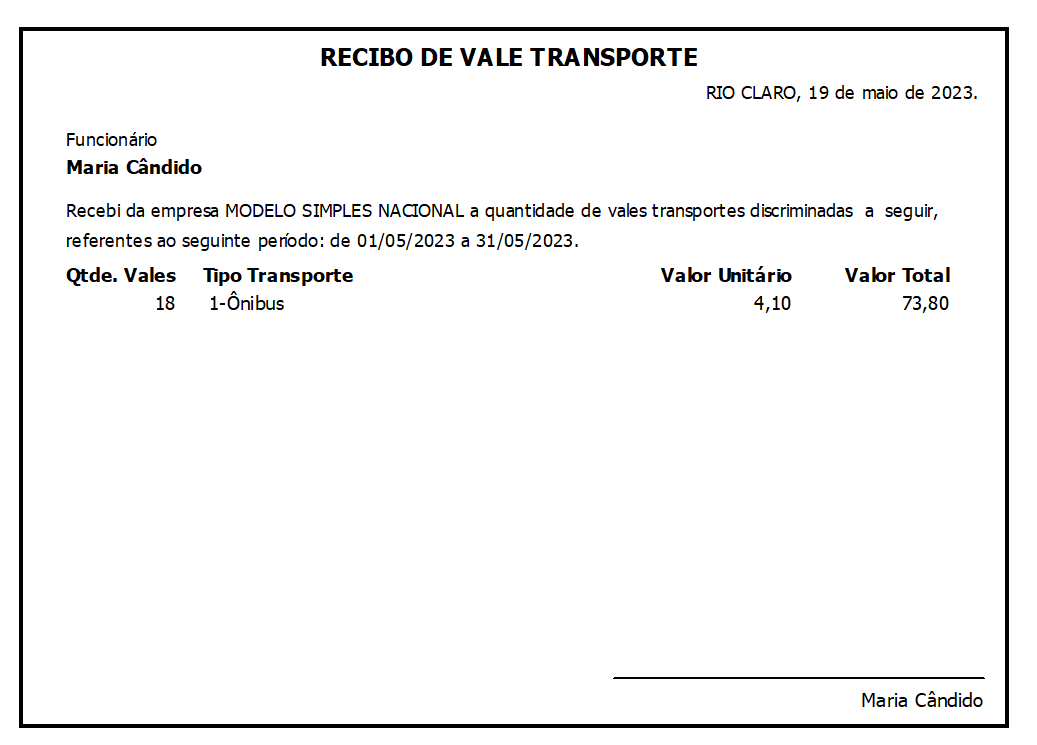
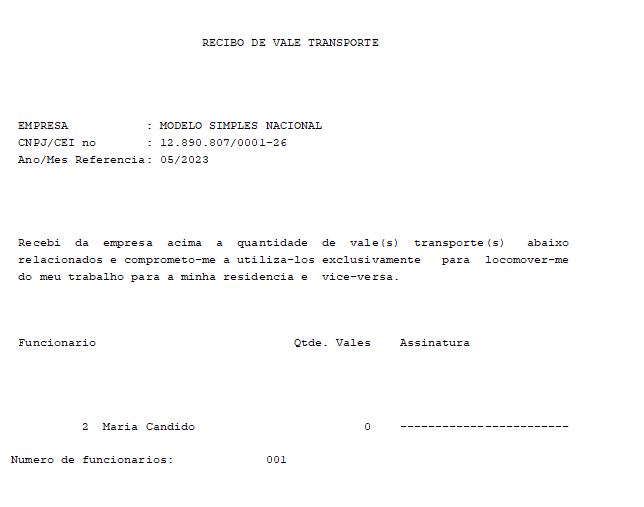
<span style="color: rgb(0, 0, 0);">Se você quiser imprimir um recibo do **Vale Transporte** para que o [Funcionário ](https://autoatendimento.grupoallegus.com.br/books/folha-de-pagamento/page/cadastrando-funcionarios-m0v)assine, poderá</span>

**<span style="color: rgb(0, 0, 0);">e.1) [Recibo de Vale Transporte](https://autoatendimento.grupoallegus.com.br/books/folha-de-pagamento/page/impressao-de-recibo-de-vale-transporte-individual)</span>**

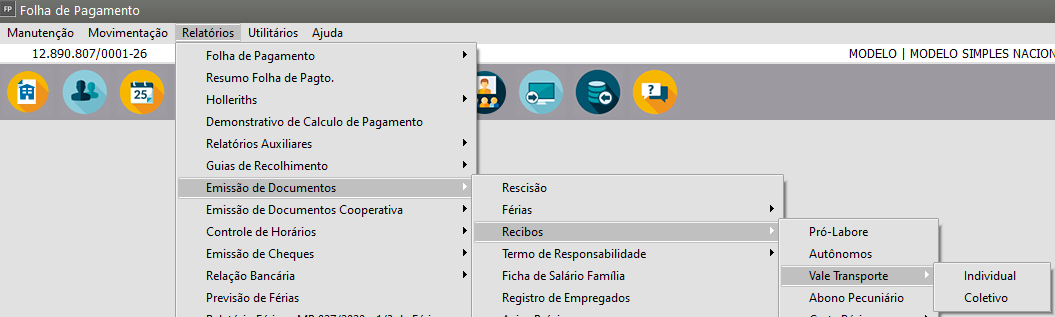
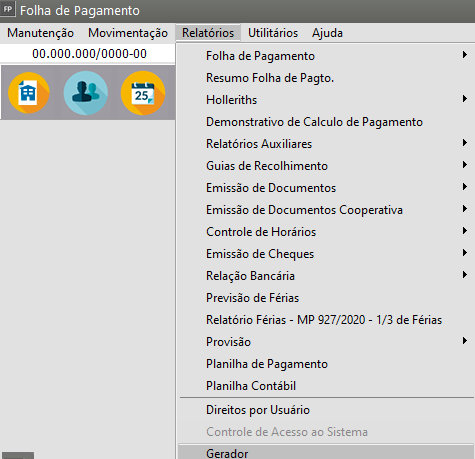
<span style="color: rgb(0, 0, 0);">Acessar o menu</span><span style="color: rgb(0, 0, 0);"> **Relatórios&gt;Emissão de Documento&gt;Recibos&gt;Vale Transporte**</span>

<span style="color: rgb(0, 0, 0);">[![image-1684529386818.png](https://autoatendimento.grupoallegus.com.br/uploads/images/gallery/2023-05/scaled-1680-/image-1684529386818.png)](https://autoatendimento.grupoallegus.com.br/uploads/images/gallery/2023-05/image-1684529386818.png)</span>

<span style="color: rgb(0, 0, 0);">Você poderá imprimir um recibo individual ou Coletivo.</span>

<span style="color: rgb(0, 0, 0);">[![image-1684529462802.png](https://autoatendimento.grupoallegus.com.br/uploads/images/gallery/2023-05/scaled-1680-/image-1684529462802.png)](https://autoatendimento.grupoallegus.com.br/uploads/images/gallery/2023-05/image-1684529462802.png)</span>

<span style="color: rgb(0, 0, 0);">[![image-1684529515763.png](https://autoatendimento.grupoallegus.com.br/uploads/images/gallery/2023-05/scaled-1680-/image-1684529515763.png)](https://autoatendimento.grupoallegus.com.br/uploads/images/gallery/2023-05/image-1684529515763.png)</span>

<span style="color: rgb(0, 0, 0);">**e.2) Solicitação de Vale Transporte**</span>

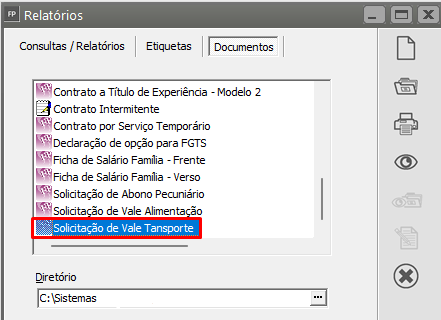
<span style="color: rgb(0, 0, 0);">O sistema oferece, ainda, através do menu **Relatórios&gt;Gerador&gt;Relatórios&gt;Aba Documentos,**</span>

[![image.png](https://autoatendimento.grupoallegus.com.br/uploads/images/gallery/2024-11/scaled-1680-/Cfmimage.png)](https://autoatendimento.grupoallegus.com.br/uploads/images/gallery/2024-11/Cfmimage.png)

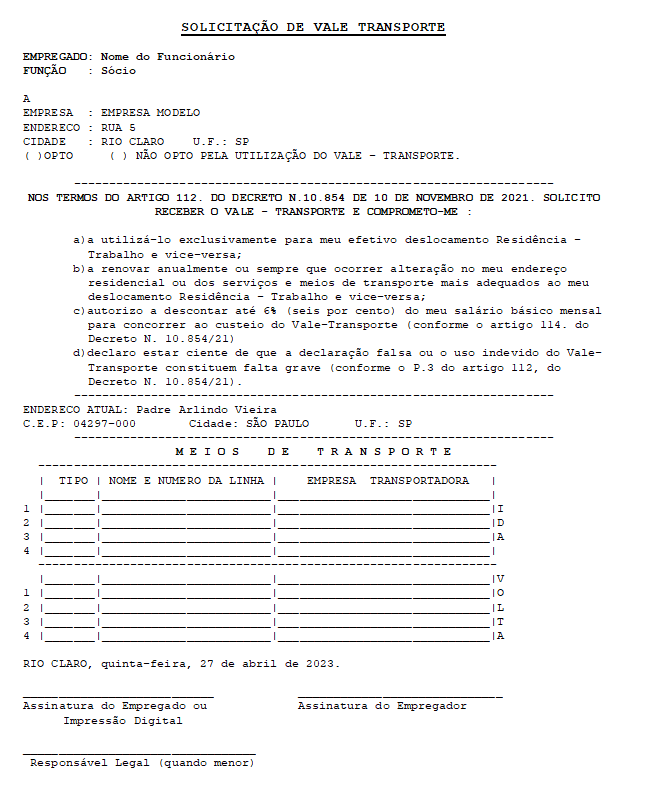
A opção para impressão da Solicitação de Vale Transporte

<span style="color: rgb(0, 0, 0);"> clique no ícone;</span>

<span style="color: rgb(0, 0, 0);">[![image.png](https://autoatendimento.grupoallegus.com.br/uploads/images/gallery/2023-08/scaled-1680-/1BKimage.png) ](https://autoatendimento.grupoallegus.com.br/uploads/images/gallery/2023-08/1BKimage.png) <span class="15">IMPRIME - Permite que você imprima o relatório, ou seja, o envie pra a impressora</span></span>

<span style="color: rgb(0, 0, 0);">[![image.png](https://autoatendimento.grupoallegus.com.br/uploads/images/gallery/2023-08/scaled-1680-/ImQimage.png) ](https://autoatendimento.grupoallegus.com.br/uploads/images/gallery/2023-08/ImQimage.png)<span class="15">PREVIEW/VISUALIZA - Permite que você visualize o relatório</span></span>

<span style="color: rgb(0, 0, 0);">[![image.png](https://autoatendimento.grupoallegus.com.br/uploads/images/gallery/2024-01/scaled-1680-/ganimage.png)](https://autoatendimento.grupoallegus.com.br/uploads/images/gallery/2024-01/ganimage.png)</span>

<span style="color: rgb(0, 0, 0);">Exemplo:</span>

<span style="color: rgb(0, 0, 0);">[![image-1682615965265.png](https://autoatendimento.grupoallegus.com.br/uploads/images/gallery/2023-04/scaled-1680-/image-1682615965265.png)](https://autoatendimento.grupoallegus.com.br/uploads/images/gallery/2023-04/image-1682615965265.png)</span>

**<span style="color: rgb(0, 0, 0);">e.3) [Relação de Transportes Utilizados](https://autoatendimento.grupoallegus.com.br/books/folha-de-pagamento/page/relacao-de-transportes-utilizados)</span>**

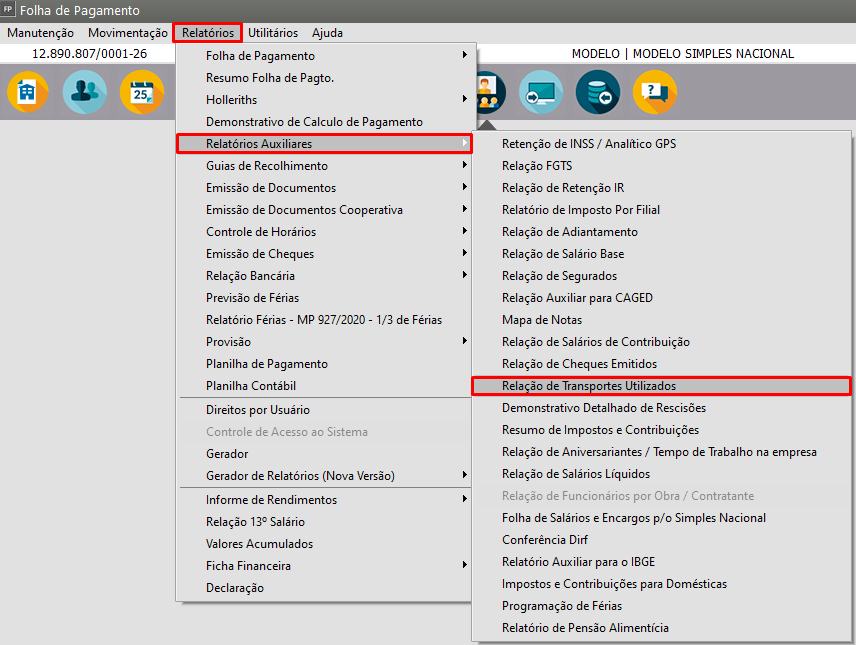
<span style="color: rgb(0, 0, 0);">Poderá inda, através do menu **Relatórios&gt;Relatórios Auxiliares&gt;Relação de Transportes Utilizados:**</span>

<span style="color: rgb(0, 0, 0);">[![image.png](https://autoatendimento.grupoallegus.com.br/uploads/images/gallery/2023-08/scaled-1680-/244image.png)](https://autoatendimento.grupoallegus.com.br/uploads/images/gallery/2023-08/244image.png)</span>

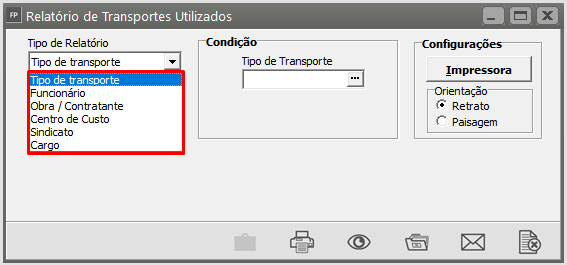
<span style="color: rgb(0, 0, 0);">Especifique qual o tipo de Relatório deseja visualizar/imprimir:</span>

- <span style="color: rgb(0, 0, 0);">Tipo de Transporte</span>
- [<span style="color: rgb(0, 0, 0);">Funcionário</span>](https://autoatendimento.grupoallegus.com.br/books/folha-de-pagamento/page/cadastrando-funcionarios-m0v)
- <span style="color: rgb(0, 0, 0);">Obra ou Contratante</span>
- <span style="color: rgb(0, 0, 0);">Centro de Custo</span>
- <span style="color: rgb(0, 0, 0);">Sindicato</span>
- <span style="color: rgb(0, 0, 0);">Cargo</span>

<span style="color: rgb(0, 0, 0);">[![image.png](https://autoatendimento.grupoallegus.com.br/uploads/images/gallery/2023-08/scaled-1680-/50Simage.png)](https://autoatendimento.grupoallegus.com.br/uploads/images/gallery/2023-08/50Simage.png)</span>

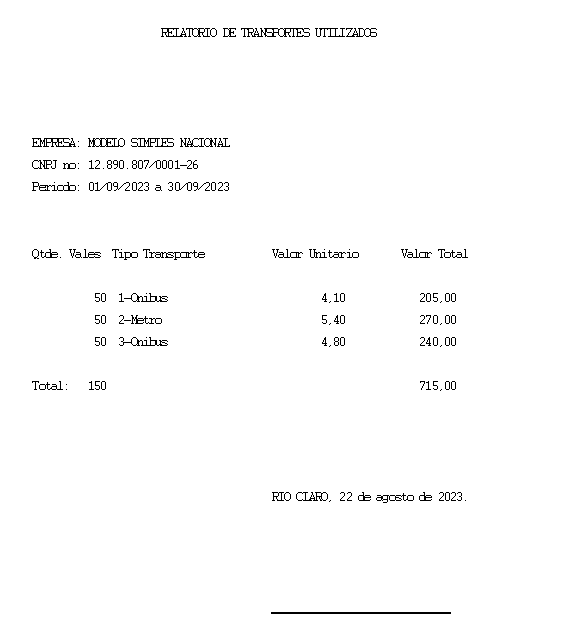
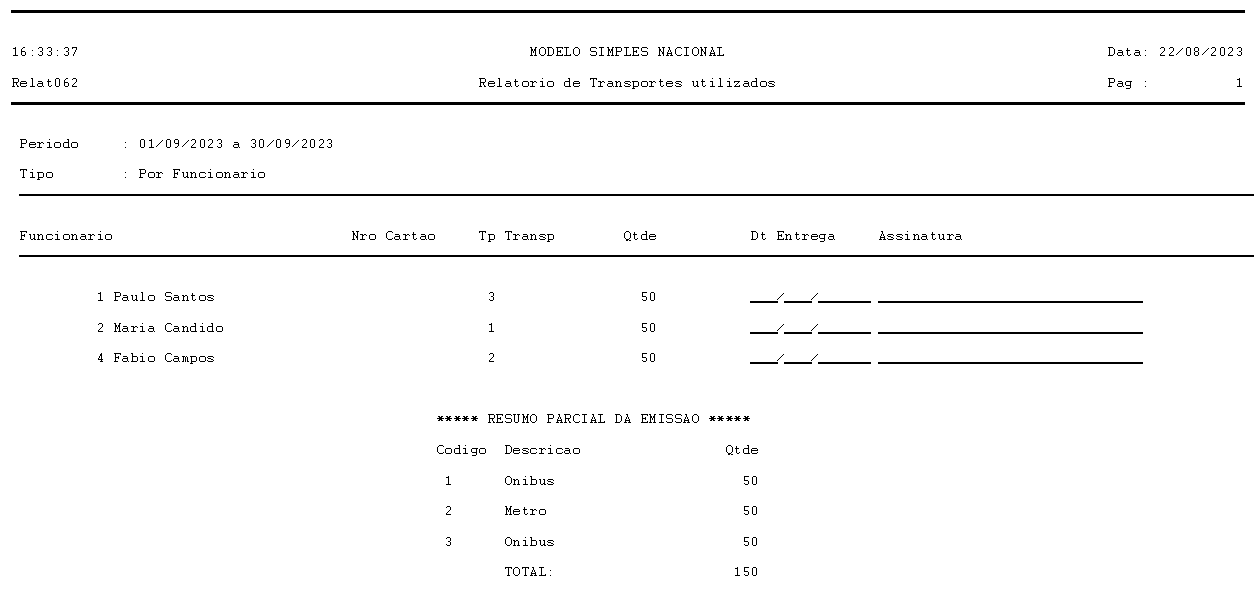
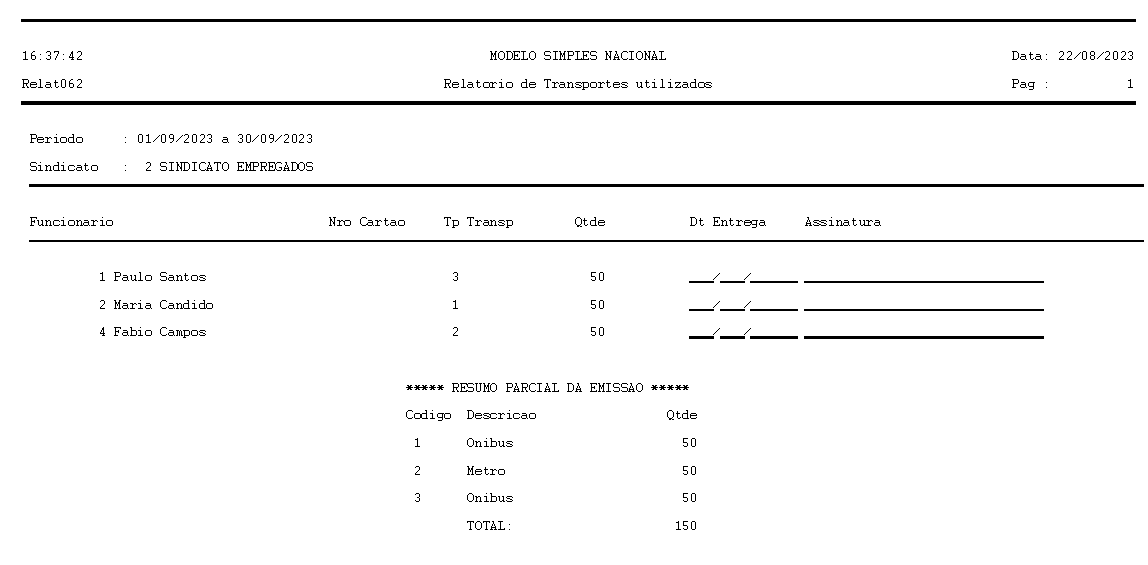
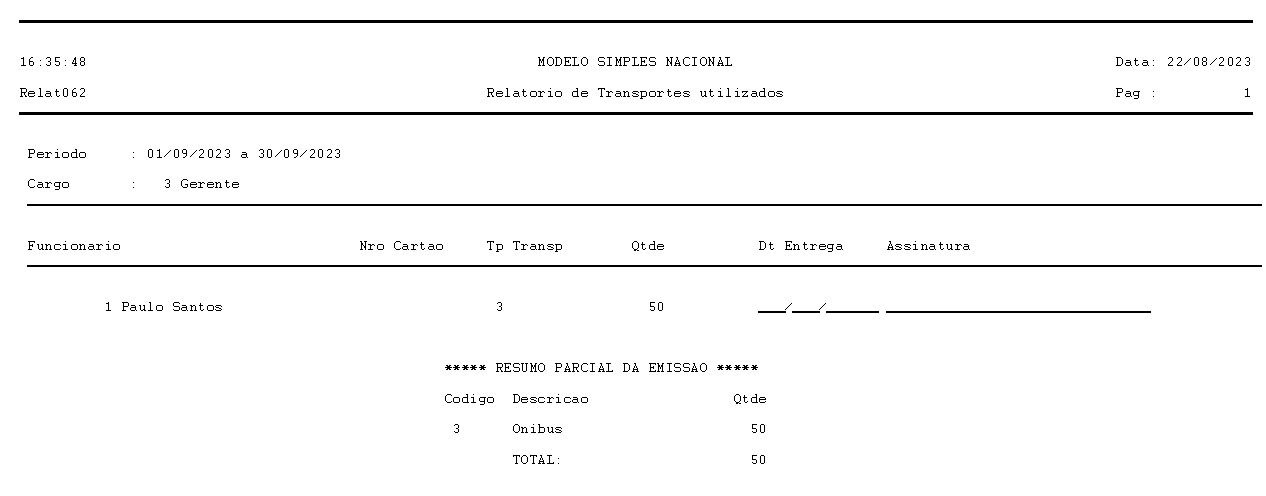
<span style="color: rgb(0, 0, 0);">Segue exemplos de impressão de algumas seleções:</span>

<span style="color: rgb(0, 0, 0);">**Tipo de Transporte:**</span>

<span style="color: rgb(0, 0, 0);">[![image.png](https://autoatendimento.grupoallegus.com.br/uploads/images/gallery/2023-08/scaled-1680-/9Kkimage.png)](https://autoatendimento.grupoallegus.com.br/uploads/images/gallery/2023-08/9Kkimage.png)</span>

<span style="color: rgb(0, 0, 0);">**Funcionário:**</span>

<span style="color: rgb(0, 0, 0);">[![image.png](https://autoatendimento.grupoallegus.com.br/uploads/images/gallery/2023-08/scaled-1680-/TPRimage.png)](https://autoatendimento.grupoallegus.com.br/uploads/images/gallery/2023-08/TPRimage.png)</span>

<span style="color: rgb(0, 0, 0);">**Sindicato:**</span>

<span style="color: rgb(0, 0, 0);">[![image.png](https://autoatendimento.grupoallegus.com.br/uploads/images/gallery/2023-08/scaled-1680-/nAZimage.png)](https://autoatendimento.grupoallegus.com.br/uploads/images/gallery/2023-08/nAZimage.png)</span>

<span style="color: rgb(0, 0, 0);">**Cargo:**</span>

[![image.png](https://autoatendimento.grupoallegus.com.br/uploads/images/gallery/2023-08/scaled-1680-/JRQimage.png)](https://autoatendimento.grupoallegus.com.br/uploads/images/gallery/2023-08/JRQimage.png)

**<span style="color: rgb(0, 0, 0);">Veja também os Itens:</span>**

- <span style="color: rgb(0, 0, 0);">[Utilizando Vale Transporte](https://autoatendimento.grupoallegus.com.br/books/folha-de-pagamento/page/utilizando-vale-transporte-isC)</span>
- [<span style="color: rgb(0, 0, 0);">Cadastrando Transporte</span>](https://autoatendimento.grupoallegus.com.br/books/folha-de-pagamento/page/cadastrando-transporte)
- [<span style="color: rgb(0, 0, 0);">Relação de Transportes Utilizados</span>](https://autoatendimento.grupoallegus.com.br/books/folha-de-pagamento/page/relacao-de-transportes-utilizados)
- [<span style="color: rgb(0, 0, 0);">Impressão de Recibo de Vale Transporte Individual</span>](https://autoatendimento.grupoallegus.com.br/books/folha-de-pagamento/page/impressao-de-recibo-de-vale-transporte-individual)
- [<span style="color: rgb(0, 0, 0);">Impressão de Recibo de Vale Transporte Coletivo</span>](https://autoatendimento.grupoallegus.com.br/books/folha-de-pagamento/page/impressao-de-recibo-de-vale-transporte-coletivo)
- [<span style="color: rgb(0, 0, 0);">Cadastrando e Calculando Vale Transporte</span>](https://autoatendimento.grupoallegus.com.br/books/folha-de-pagamento/page/cadastrando-e-calculando-vale-transporte)