# Alterando as Propriedades do Gráfico

<center id="bkmrk-%C2%A0"></center><iframe allowfullscreen="allowfullscreen" height="470" src="https://www.youtube.com/embed/pS1wQxczCgs" style="width: 838px; height: 470px;" width="838"></iframe>

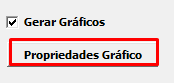
<span style="color: rgb(0, 0, 0); font-family: Arial; font-size: small;">Os relatórios com suporte a geração de gráficos terão o seguinte botão onde o usuário poderá alterar as opções do gráfico.</span>

[![image.png](https://autoatendimento.grupoallegus.com.br/uploads/images/gallery/2023-11/scaled-1680-/MT9image.png)](https://autoatendimento.grupoallegus.com.br/uploads/images/gallery/2023-11/MT9image.png)

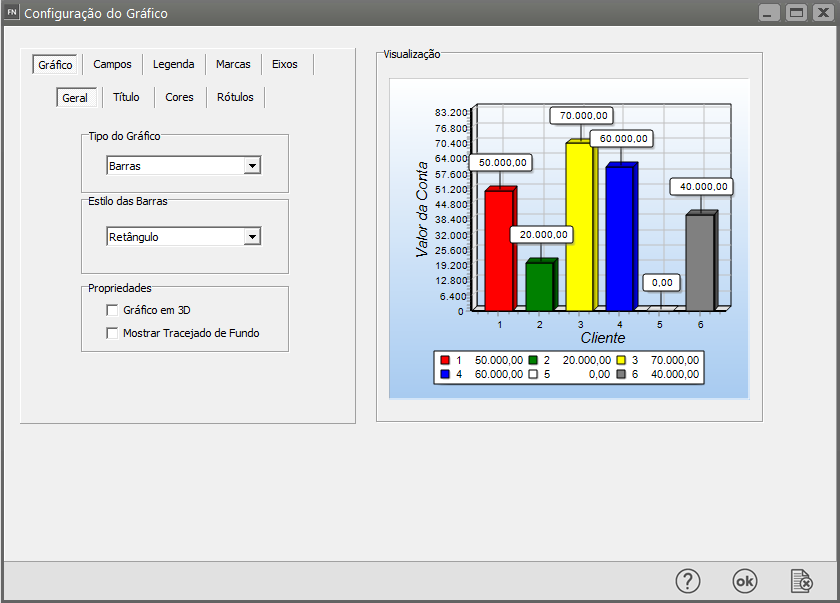
<span style="color: rgb(0, 0, 0); font-family: Arial; font-size: small;">Clicando nele abrirá a janela de configuração do gráfico.</span>

[![image.png](https://autoatendimento.grupoallegus.com.br/uploads/images/gallery/2023-11/scaled-1680-/kvCimage.png)](https://autoatendimento.grupoallegus.com.br/uploads/images/gallery/2023-11/kvCimage.png)

<span style="text-decoration: underline;"><span style="color: rgb(0, 0, 0); font-family: Arial; font-size: small; text-decoration: underline;">**<span style="font-size: small;">Aba Gráfico</span>**</span></span>

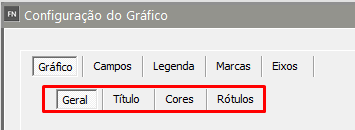
<span style="color: rgb(0, 0, 0); font-family: Arial; font-size: small;">Nesta aba são alteradas as opções principais do gráfico. Ela contém 4 sub-abas: Geral, Título, Cores e Rótulos.</span>

[![image.png](https://autoatendimento.grupoallegus.com.br/uploads/images/gallery/2023-11/scaled-1680-/aHqimage.png)](https://autoatendimento.grupoallegus.com.br/uploads/images/gallery/2023-11/aHqimage.png)

<span style="color: rgb(0, 0, 0); font-family: Arial; font-size: small;"> **Geral**</span>

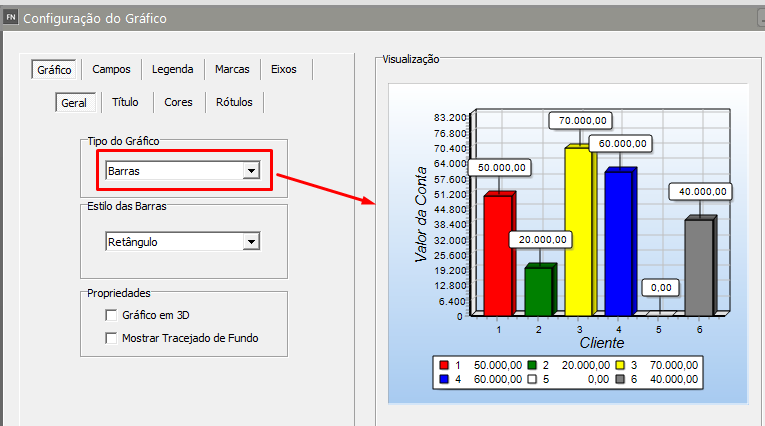
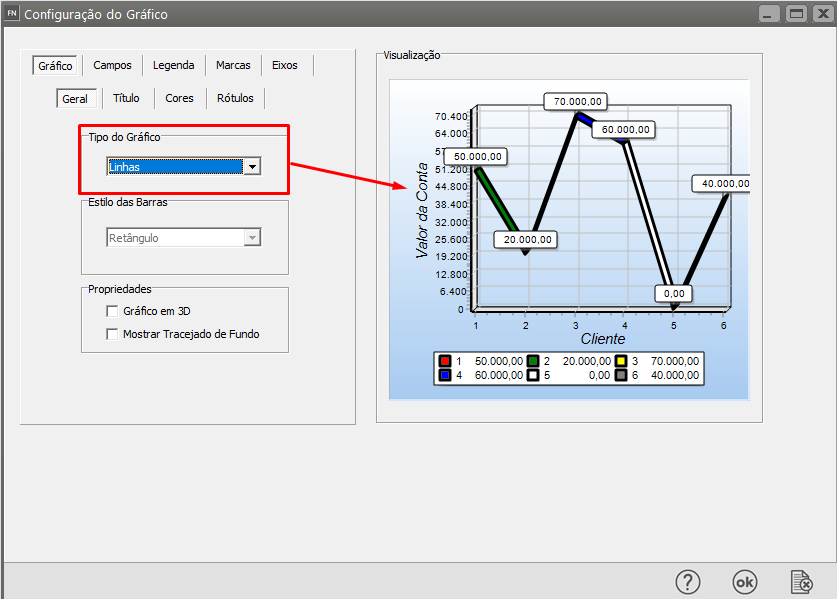
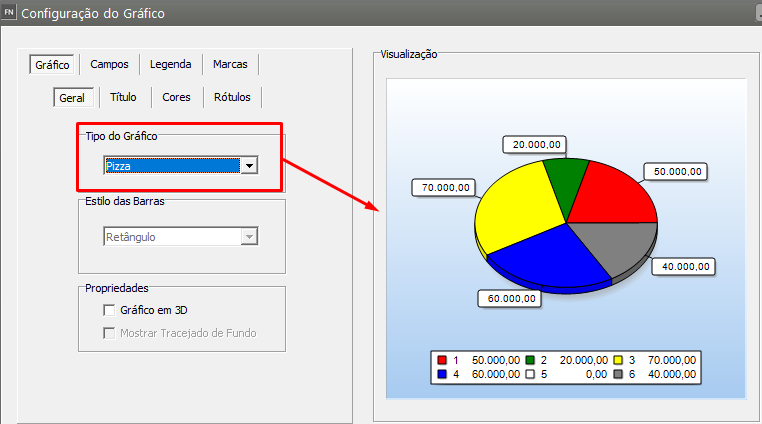
<span style="color: rgb(0, 0, 0); font-family: Arial; font-size: small;"> Tipo do Gráfico: Altera o tipo do gráfico. As opções são Gráfico de Barras, Gráfico de Linhas e Gráfico Tipo Pizza.</span>

<span style="color: rgb(0, 0, 0); font-family: Arial; font-size: small;"> </span>[![image.png](https://autoatendimento.grupoallegus.com.br/uploads/images/gallery/2023-11/scaled-1680-/6Nfimage.png)](https://autoatendimento.grupoallegus.com.br/uploads/images/gallery/2023-11/6Nfimage.png)

<span style="color: rgb(0, 0, 0); font-family: Arial; font-size: small;"> </span>

[![image.png](https://autoatendimento.grupoallegus.com.br/uploads/images/gallery/2023-11/scaled-1680-/Jguimage.png)](https://autoatendimento.grupoallegus.com.br/uploads/images/gallery/2023-11/Jguimage.png)

<span style="color: rgb(0, 0, 0); font-family: Arial; font-size: small;"> </span>[![image.png](https://autoatendimento.grupoallegus.com.br/uploads/images/gallery/2023-11/scaled-1680-/ngXimage.png)](https://autoatendimento.grupoallegus.com.br/uploads/images/gallery/2023-11/ngXimage.png)

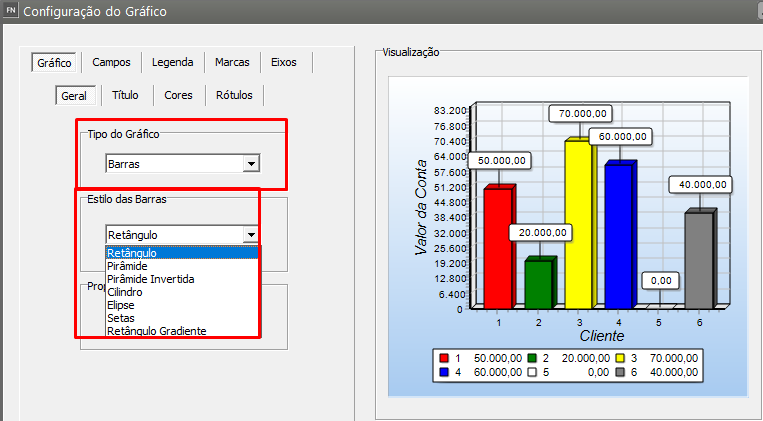
<span style="color: rgb(0, 0, 0); font-family: Arial; font-size: small;">Estilo das Barras: Esta opção só ficará habilitada se o gráfico for do tipo barras. Aqui você escolhe o estilo das Barras.</span>

[![image.png](https://autoatendimento.grupoallegus.com.br/uploads/images/gallery/2023-11/scaled-1680-/I09image.png)](https://autoatendimento.grupoallegus.com.br/uploads/images/gallery/2023-11/I09image.png)

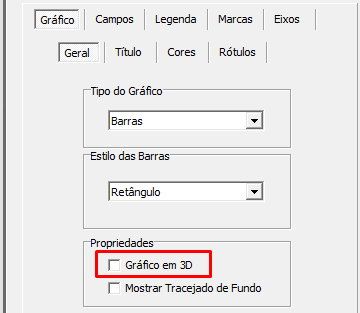
<span style="color: rgb(0, 0, 0); font-family: Arial; font-size: small;"> Gráfico em 3D: Habilita ou desabilita a visualização dos gráficos em três dimensões.</span>

[![image.png](https://autoatendimento.grupoallegus.com.br/uploads/images/gallery/2023-11/scaled-1680-/iHyimage.png)](https://autoatendimento.grupoallegus.com.br/uploads/images/gallery/2023-11/iHyimage.png)

<span style="color: rgb(0, 0, 0); font-family: Arial; font-size: small;"> Mostrar Grid: Habilita ou desabilita a exibição do grid.</span>

<span style="color: rgb(0, 0, 0); font-family: Arial; font-size: small;">  **Título**</span>

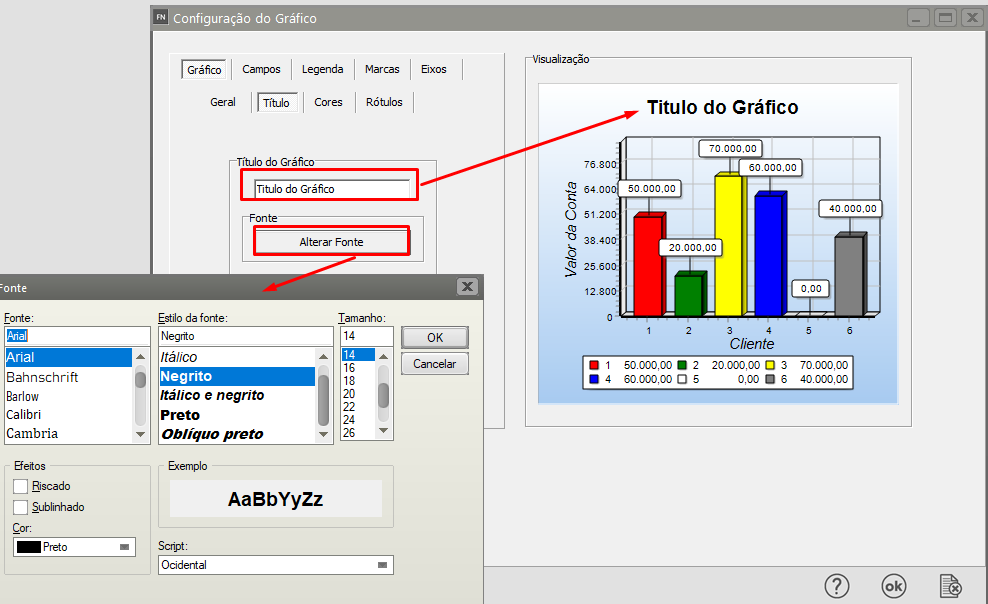
<span style="color: rgb(0, 0, 0); font-family: Arial; font-size: small;"> Permite alterar o título do gráfico e sua fonte.</span>

[![image.png](https://autoatendimento.grupoallegus.com.br/uploads/images/gallery/2023-11/scaled-1680-/DDcimage.png)](https://autoatendimento.grupoallegus.com.br/uploads/images/gallery/2023-11/DDcimage.png)

<span style="color: rgb(0, 0, 0); font-family: Arial; font-size: small;">  **Cores**</span>

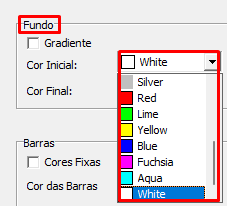
<span style="color: rgb(0, 0, 0); font-family: Arial; font-size: small;"> Fundo: Exibe ou oculta o gradiente de fundo e permite alterar sua cor.</span>

[![image.png](https://autoatendimento.grupoallegus.com.br/uploads/images/gallery/2023-11/scaled-1680-/AWIimage.png)](https://autoatendimento.grupoallegus.com.br/uploads/images/gallery/2023-11/AWIimage.png)

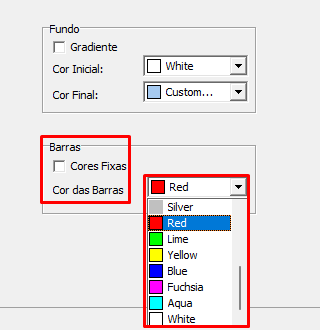
<span style="color: rgb(0, 0, 0); font-family: Arial; font-size: small;"> Outras: Permite a seleção das cores das barras/linhas do gráfico. Obs: Esta opção não estará disponível para gráficos do tipo pizza.</span>

[![image.png](https://autoatendimento.grupoallegus.com.br/uploads/images/gallery/2023-11/scaled-1680-/0Uyimage.png)](https://autoatendimento.grupoallegus.com.br/uploads/images/gallery/2023-11/0Uyimage.png)

<span style="color: rgb(0, 0, 0); font-family: Arial; font-size: small;">  **Rótulos**</span>

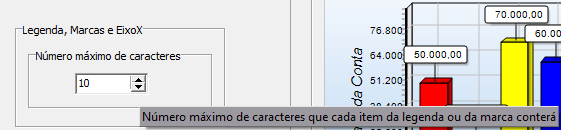
<span style="color: rgb(0, 0, 0); font-family: Arial; font-size: small;"> Permite limitar o número de caracteres que aparecerá nos textos do eixo X e nas marcas do gráfico. Ex: Se configurado com 10, todos rótulos do eixo X que tem mais que 10 caracteres serão cortados e aparecerão apenas com o número estabelecido de caracteres. Obs: Para deixar o número de caracteres ilimitado basta configurá-lo com zero.</span>

[![image.png](https://autoatendimento.grupoallegus.com.br/uploads/images/gallery/2023-11/scaled-1680-/MgYimage.png)](https://autoatendimento.grupoallegus.com.br/uploads/images/gallery/2023-11/MgYimage.png)

<span style="color: rgb(0, 0, 0); font-family: Arial; font-size: small;">  
<span style="font-size: small;">**Aba Campos**</span></span>

<span style="color: rgb(0, 0, 0); font-family: Arial; font-size: small;"> Esta aba só estará visível para relatórios nos quais o usuário tem a opção de configurar os campos que aparecerão no gráfico. As seguintes opções podem ser alteradas:</span>

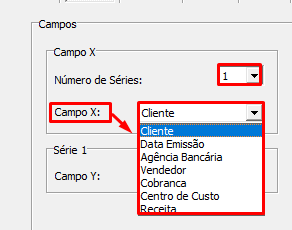
<span style="color: rgb(0, 0, 0); font-family: Arial; font-size: small;"> Número de Séries: Permite ao usuário configurar o número de séries que irão aparecer no gráfico. Alguns relatórios permitem selecionar apenas uma série.   
 Através do "CampoX" é possível alterar o campo que controlará o eixo X do gráfico (horizontal).</span>

[![image.png](https://autoatendimento.grupoallegus.com.br/uploads/images/gallery/2023-11/scaled-1680-/Zrpimage.png)](https://autoatendimento.grupoallegus.com.br/uploads/images/gallery/2023-11/Zrpimage.png)

<span style="color: rgb(0, 0, 0); font-family: Arial; font-size: small;">  
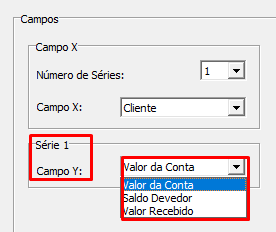
 Através do "CampoY" é possível alterar o campo que controlará o eixo Y do gráfico (vertical).</span>

[![image.png](https://autoatendimento.grupoallegus.com.br/uploads/images/gallery/2023-11/scaled-1680-/YPrimage.png)](https://autoatendimento.grupoallegus.com.br/uploads/images/gallery/2023-11/YPrimage.png)

<span style="color: rgb(0, 0, 0); font-family: Arial; font-size: small;">  
**<span style="font-size: small;">Aba Legenda</span>**</span>

<span style="color: rgb(0, 0, 0); font-family: Arial; font-size: small;"> Esta aba permite a configuração da legenda do gráfico. As seguintes opções estão disponíveis:</span>

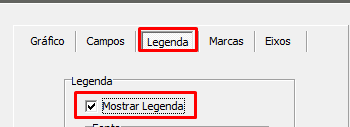
<span style="color: rgb(0, 0, 0); font-family: Arial; font-size: small;"> Mostra Legenda: Exibe ou oculta a legenda do gráfico.</span>

[![image.png](https://autoatendimento.grupoallegus.com.br/uploads/images/gallery/2023-11/scaled-1680-/Q6Oimage.png)](https://autoatendimento.grupoallegus.com.br/uploads/images/gallery/2023-11/Q6Oimage.png)

<span style="color: rgb(0, 0, 0); font-family: Arial; font-size: small;">  
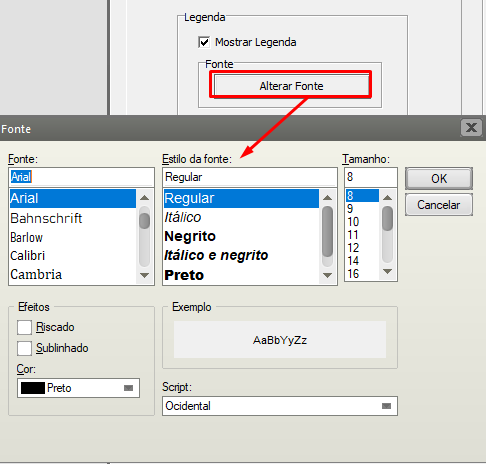
 Fonte: Altera a fonte da legenda.</span>

[![image.png](https://autoatendimento.grupoallegus.com.br/uploads/images/gallery/2023-11/scaled-1680-/c7Nimage.png)](https://autoatendimento.grupoallegus.com.br/uploads/images/gallery/2023-11/c7Nimage.png)

<span style="color: rgb(0, 0, 0); font-family: Arial; font-size: small;">  
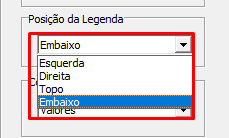
 Posição da legenda: Altera o local onde a legenda está posicionada (Esquerda, Direita, Baixo ou Topo).</span>

[![image.png](https://autoatendimento.grupoallegus.com.br/uploads/images/gallery/2023-11/scaled-1680-/Gcbimage.png)](https://autoatendimento.grupoallegus.com.br/uploads/images/gallery/2023-11/Gcbimage.png)

<span style="color: rgb(0, 0, 0); font-family: Arial; font-size: small;">  
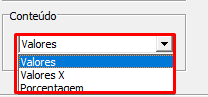
 Conteúdo: Altera os valores que serão mostrados na legenda (Valores, Valores X ou Porcentagem). </span>

[![image.png](https://autoatendimento.grupoallegus.com.br/uploads/images/gallery/2023-11/scaled-1680-/c5rimage.png)](https://autoatendimento.grupoallegus.com.br/uploads/images/gallery/2023-11/c5rimage.png)

<span style="color: rgb(0, 0, 0); font-family: Arial; font-size: small;">**Aba Marcas**</span>

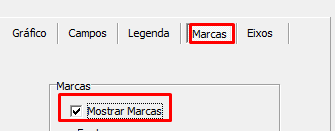
<span style="color: rgb(0, 0, 0); font-family: Arial; font-size: small;"> Esta aba permite a configuração das marcas que serão exibidas no gráfico. As seguintes opções estão disponíveis:</span>

<span style="color: rgb(0, 0, 0); font-family: Arial; font-size: small;"> Mostrar Marcas: Exibe ou oculta as marcas.</span>

[![image.png](https://autoatendimento.grupoallegus.com.br/uploads/images/gallery/2023-11/scaled-1680-/nx5image.png)](https://autoatendimento.grupoallegus.com.br/uploads/images/gallery/2023-11/nx5image.png)

<span style="color: rgb(0, 0, 0); font-family: Arial; font-size: small;">  
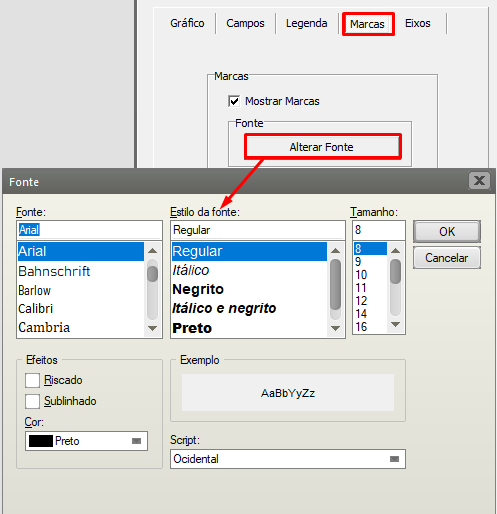
 Fonte: Altera a fonte das marcas.</span>

[![image.png](https://autoatendimento.grupoallegus.com.br/uploads/images/gallery/2023-11/scaled-1680-/rnJimage.png)](https://autoatendimento.grupoallegus.com.br/uploads/images/gallery/2023-11/rnJimage.png)

<span style="color: rgb(0, 0, 0); font-family: Arial; font-size: small;">  
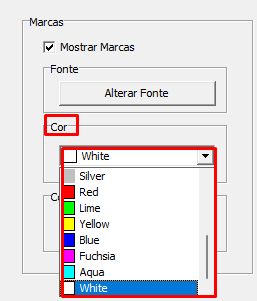
 Cor: Altera a cor de fundo das marcas.</span>

[![image.png](https://autoatendimento.grupoallegus.com.br/uploads/images/gallery/2023-11/scaled-1680-/g8aimage.png)](https://autoatendimento.grupoallegus.com.br/uploads/images/gallery/2023-11/g8aimage.png)

<span style="color: rgb(0, 0, 0); font-family: Arial; font-size: small;">  
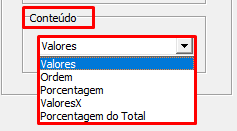
 Conteúdo: Altera o que as marcas exibirão (Valores, Ordem, Porcentagem, Valores X, Porcentagem do Total).</span>

[![image.png](https://autoatendimento.grupoallegus.com.br/uploads/images/gallery/2023-11/scaled-1680-/vGTimage.png)](https://autoatendimento.grupoallegus.com.br/uploads/images/gallery/2023-11/vGTimage.png)

<span style="color: rgb(0, 0, 0); font-family: Arial; font-size: small;">**Aba Eixos**</span>

<span style="color: rgb(0, 0, 0); font-family: Arial; font-size: small;"> Esta aba permite alterar as propriedades dos eixos X e Y. As seguintes opções estão disponíveis:</span>

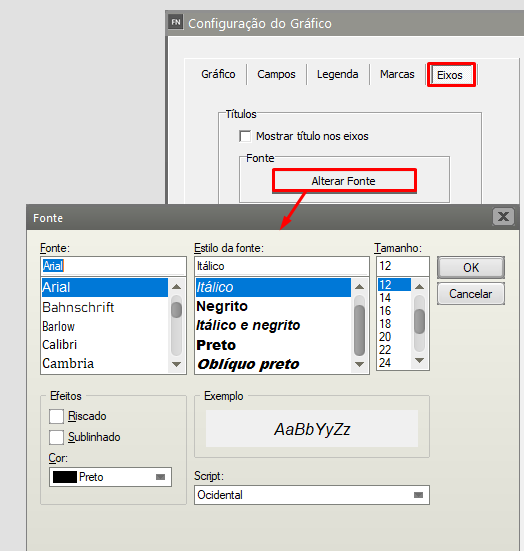
<span style="color: rgb(0, 0, 0); font-family: Arial; font-size: small;"> Títulos: Exibe ou oculta o título dos eixos e altera sua fonte.</span>

[![image.png](https://autoatendimento.grupoallegus.com.br/uploads/images/gallery/2023-11/scaled-1680-/B7iimage.png)](https://autoatendimento.grupoallegus.com.br/uploads/images/gallery/2023-11/B7iimage.png)

<span style="color: rgb(0, 0, 0); font-family: Arial; font-size: small;">  
 Valores: Altera a fonte exibida nos valores mostrados nos eixos.</span>

[![image.png](https://autoatendimento.grupoallegus.com.br/uploads/images/gallery/2023-11/scaled-1680-/I1Zimage.png)](https://autoatendimento.grupoallegus.com.br/uploads/images/gallery/2023-11/I1Zimage.png)

<span style="color: rgb(0, 0, 0); font-family: Arial; font-size: small;">  
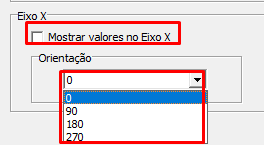
 EixoX: Permite exibir ou ocultar os valores mostrados no eixo X, e alterar sua rotação.</span>

[![image.png](https://autoatendimento.grupoallegus.com.br/uploads/images/gallery/2023-11/scaled-1680-/u04image.png)](https://autoatendimento.grupoallegus.com.br/uploads/images/gallery/2023-11/u04image.png)