# Realizando o recálculo dos saldos
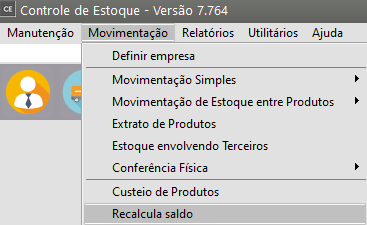
Para recálculo de saldos, você deve acessar **Movimentação/Recalcula Saldo**
[](https://autoatendimento.grupoallegus.com.br/uploads/images/gallery/2023-10/Gxqimage.png)
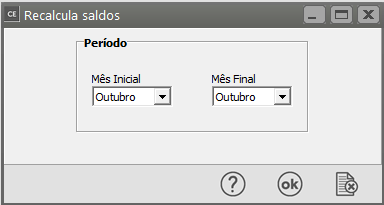
Informe o **Mês Inicial e o Mês Final.**
[](https://autoatendimento.grupoallegus.com.br/uploads/images/gallery/2023-10/a8limage.png)
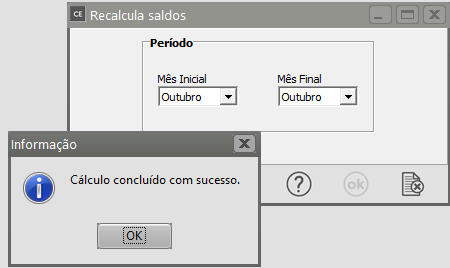
O recalculo será feito de mês em mês a partir do **Mês Inicial até o Final** que limitarão o período que deverá ser recalculado. Ao cadastrar uma [movimentação simples](https://autoatendimento.grupoallegus.com.br/books/ce/page/cadastrando-movimentacao-simples), o recalculo do saldo é executado automaticamente para os [produtos](https://autoatendimento.grupoallegus.com.br/books/ce/page/cadastrando-os-produtos) lançados no período ativo. Assim, você deverá executar este processo somente quando tiver dúvidas sobre os saldos dos[ produtos.](https://autoatendimento.grupoallegus.com.br/books/ce/page/cadastrando-os-produtos)
[](https://autoatendimento.grupoallegus.com.br/uploads/images/gallery/2023-10/rEXimage.png)