# Movimentando Estoque entre Produtos

**<iframe allowfullscreen="allowfullscreen" height="314" src="https://www.youtube.com/embed/0NqHqnd1PBM" width="560"></iframe>**


<span style="color: rgb(0, 0, 0); font-family: Arial; font-size: small;">Para a utilização deste menu, o Sistema não deverá estar [parametrização](https://autoatendimento.grupoallegus.com.br/books/ce/page/parametrizando-empresa) para utilização de [série.](https://autoatendimento.grupoallegus.com.br/books/ce/page/trabalhando-com-controle-de-serie-dos-produtos-manufaturados)</span>

<span style="color: rgb(0, 0, 0); font-family: Arial; font-size: small;">Com a tela de Movimentação de Estoque entre [produtos](https://autoatendimento.grupoallegus.com.br/books/ce/page/cadastrando-os-produtos), é possível transferir saldo de um [produto](https://autoatendimento.grupoallegus.com.br/books/ce/page/cadastrando-os-produtos) para outro de forma automática,  
sem a geração manual de movimentação simples de entrada e saida.</span>  
  
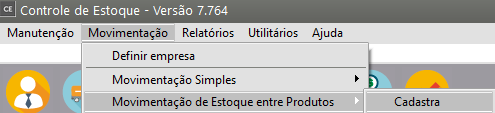
<span style="color: rgb(0, 0, 0); font-family: Arial; font-size: small;">Acesse o menu **Movimentações/Movimentação de Estoque entre [Produtos.](https://autoatendimento.grupoallegus.com.br/books/ce/page/cadastrando-os-produtos)**</span>

[![image.png](https://autoatendimento.grupoallegus.com.br/uploads/images/gallery/2023-10/scaled-1680-/LNhimage.png)](https://autoatendimento.grupoallegus.com.br/uploads/images/gallery/2023-10/LNhimage.png)

<div id="bkmrk-informe-o%C2%A0n%C3%BAmero-de-" style="text-align: justify;"><span style="color: rgb(0, 0, 0); font-family: Arial; font-size: small;">Informe:</span></div><div id="bkmrk---n%C3%BAmero-de-document" style="text-align: justify;"><span style="color: rgb(0, 0, 0); font-family: Arial; font-size: small;">- número de documento para essa movimentação</span></div><div id="bkmrk---data-da-movimenta%C3%A7" style="text-align: justify;"><span style="color: rgb(0, 0, 0); font-family: Arial; font-size: small;">- data da movimentação</span></div><div id="bkmrk---insira-tamb%C3%A9m-as-i" style="text-align: justify;"><span style="color: rgb(0, 0, 0); font-family: Arial; font-size: small;">- insira também as informações referentes aos documentos de entrada e saída que serão gerados - [Tipo de Documento](https://autoatendimento.grupoallegus.com.br/books/ce/page/definindo-tipos-de-documentos) e Número de Documento</span></div><div id="bkmrk-." style="text-align: justify;"><span style="color: rgb(0, 0, 0); font-family: Arial; font-size: small;">.</span></div>[![image.png](https://autoatendimento.grupoallegus.com.br/uploads/images/gallery/2023-10/scaled-1680-/Qalimage.png)](https://autoatendimento.grupoallegus.com.br/uploads/images/gallery/2023-10/Qalimage.png)

<div id="bkmrk-na-parte-inferior-h%C3%A1" style="text-align: justify;"><span style="color: rgb(0, 0, 0); font-family: Arial; font-size: small;">Na parte inferior há o campo observação, importante para se guardar alguma informação relevante.</span></div><div id="bkmrk--6" style="text-align: justify;"></div><div id="bkmrk--7" style="text-align: justify;"></div>[![image.png](https://autoatendimento.grupoallegus.com.br/uploads/images/gallery/2023-10/scaled-1680-/IKCimage.png)](https://autoatendimento.grupoallegus.com.br/uploads/images/gallery/2023-10/IKCimage.png)

<div id="bkmrk---a-coluna-azul-repr" style="text-align: justify;">  
<span style="color: rgb(0, 0, 0); font-family: Arial; font-size: small;">- A coluna azul representa a informação do [produto](https://autoatendimento.grupoallegus.com.br/books/ce/page/cadastrando-os-produtos) Origem, </span></div><div id="bkmrk---a-amarela-do-produ" style="text-align: justify;"><span style="color: rgb(0, 0, 0); font-family: Arial; font-size: small;">- A amarela do [produto](https://autoatendimento.grupoallegus.com.br/books/ce/page/cadastrando-os-produtos) Destino. </span></div><div id="bkmrk---a-coluna-verde-rep" style="text-align: justify;"><span style="color: rgb(0, 0, 0); font-family: Arial; font-size: small;">- A coluna verde representa a quantidade transferida </span><span style="color: rgb(0, 0, 0); font-family: Arial; font-size: small;">de um [produto ](https://autoatendimento.grupoallegus.com.br/books/ce/page/cadastrando-os-produtos)para outro.  
Algumas dessas informações fazem parte da [parametrização dos produtos](https://autoatendimento.grupoallegus.com.br/books/ce/page/parametrizando-produtos), podendo incluir Localização, Lote, Caracteristica 1 e 2.</span></div><div id="bkmrk--9" style="text-align: justify;"></div><div id="bkmrk--10" style="text-align: justify;"></div><div id="bkmrk--11" style="text-align: justify;"></div>[![image.png](https://autoatendimento.grupoallegus.com.br/uploads/images/gallery/2023-10/scaled-1680-/is7image.png)](https://autoatendimento.grupoallegus.com.br/uploads/images/gallery/2023-10/is7image.png)

<div id="bkmrk-o-campo-respons%C3%A1vel-" style="text-align: justify;"><span style="color: rgb(0, 0, 0); font-family: Arial; font-size: small;">O campo Responsável guarda o usuário responsável pela movimentação.</span>  
</div><div id="bkmrk--13" style="text-align: justify;"></div><div id="bkmrk--14" style="text-align: justify;"></div>[![image.png](https://autoatendimento.grupoallegus.com.br/uploads/images/gallery/2023-10/scaled-1680-/6d6image.png)](https://autoatendimento.grupoallegus.com.br/uploads/images/gallery/2023-10/6d6image.png)

<div id="bkmrk-ap%C3%B3s-a-grava%C3%A7%C3%A3o-das-" style="text-align: justify;"><div style="text-align: justify;"><div style="text-align: justify;"><span style="color: rgb(0, 0, 0);">![](https://www.help.supersoft.com.br/CE/imagens/cadastrandomovimentacaoestoqueentreprodutos2.png)<span style="font-family: Arial; font-size: small;">Após a gravação das informações, as movimentações de Entrada e Saída correspondentes são geradas. </span></span></div><div style="text-align: justify;"><span style="color: rgb(0, 0, 0);"><span style="font-family: Arial; font-size: small;">Elas podem ser visualizadas na tela de </span></span>**<span style="color: rgb(0, 0, 0); font-family: Arial; font-size: small;">Manutenção da Movimentação de Estoque entre [Produtos](https://autoatendimento.grupoallegus.com.br/books/ce/page/cadastrando-os-produtos)</span>**<div style="text-align: justify;">  
</div></div></div></div>[![image.png](https://autoatendimento.grupoallegus.com.br/uploads/images/gallery/2023-10/scaled-1680-/gsPimage.png)](https://autoatendimento.grupoallegus.com.br/uploads/images/gallery/2023-10/gsPimage.png)

[![image.png](https://autoatendimento.grupoallegus.com.br/uploads/images/gallery/2023-10/scaled-1680-/6XAimage.png)](https://autoatendimento.grupoallegus.com.br/uploads/images/gallery/2023-10/6XAimage.png)

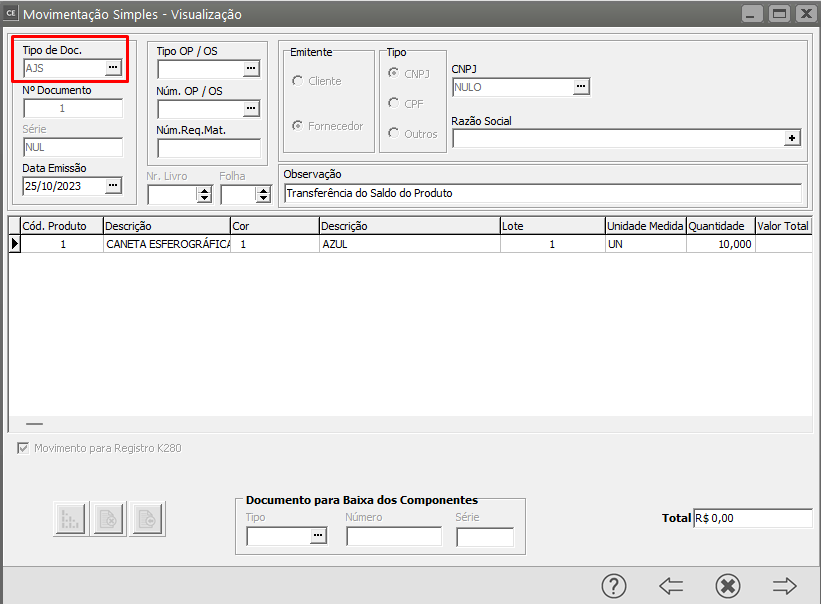
<div id="bkmrk-o-ou-acessando-o-men" style="text-align: justify;"><div style="text-align: justify;"><div style="text-align: justify;"><div style="text-align: justify;">O<span style="color: rgb(0, 0, 0); font-family: Arial; font-size: small;"> ou acessando o menu **Movimentação/Movimentação Simples.**  
</span></div><div style="text-align: justify;">  
</div></div></div></div><div id="bkmrk--18" style="text-align: justify;"></div><div id="bkmrk--19" style="text-align: justify;"><span style="color: rgb(0, 0, 0); font-family: Arial; font-size: small;">[![image.png](https://autoatendimento.grupoallegus.com.br/uploads/images/gallery/2023-10/scaled-1680-/s1Pimage.png)](https://autoatendimento.grupoallegus.com.br/uploads/images/gallery/2023-10/s1Pimage.png)</span></div><div id="bkmrk--20" style="text-align: justify;"></div>[![image.png](https://autoatendimento.grupoallegus.com.br/uploads/images/gallery/2023-10/scaled-1680-/5Q3image.png)](https://autoatendimento.grupoallegus.com.br/uploads/images/gallery/2023-10/5Q3image.png)

<div id="bkmrk--22" style="text-align: justify;"><div style="text-align: justify;"><div style="text-align: justify;"><div style="text-align: justify;"><div style="text-align: justify;"><span style="color: rgb(0, 0, 0); font-family: Arial; font-size: small;">![](https://www.help.supersoft.com.br/CE/imagens/cadastrandomovimentacaoestoqueentreprodutos3.png)</span></div></div></div></div></div>[![image.png](https://autoatendimento.grupoallegus.com.br/uploads/images/gallery/2023-10/scaled-1680-/iCsimage.png)](https://autoatendimento.grupoallegus.com.br/uploads/images/gallery/2023-10/iCsimage.png)

**Veja também os Itens:**

- [Trabalhando com Controle de Série para produtos Manufaturados](https://autoatendimento.grupoallegus.com.br/books/ce/page/trabalhando-com-controle-de-serie-dos-produtos-manufaturados)
- [Cadastrando Produtos](https://autoatendimento.grupoallegus.com.br/books/ce/page/cadastrando-os-produtos)
- [Relacionamento entre Produtos e Fornecedores](https://autoatendimento.grupoallegus.com.br/books/ce/page/relacionamento-entre-produtos-e-fornecedores)
- [Cadastrando Engenharia de Produtos](https://autoatendimento.grupoallegus.com.br/books/ce/page/cadastrando-engenharia-do-produto)
- [Alterando o Código do Produto](https://autoatendimento.grupoallegus.com.br/books/ce/page/alterando-o-codigo-do-produto)
- [Realizando o Custeio dos Produtos e das Ordens de Produção](https://autoatendimento.grupoallegus.com.br/books/ce/page/realizando-o-custeio-dos-produtos-e-da-producao)
- [Consultando Saldos e Custos dos Produtos](https://autoatendimento.grupoallegus.com.br/books/ce/page/consultando-saldos-e-custos-dos-produtos)
- [Movimentando Estoque entre Produtos](https://autoatendimento.grupoallegus.com.br/books/ce/page/movimentando-estoque-entre-produtos)
- [Controlando o Inventário dos Produtos](https://autoatendimento.grupoallegus.com.br/books/ce/page/controlando-o-inventario-dos-produtos)
- [Trabalhando com Lote de Produtos](https://autoatendimento.grupoallegus.com.br/books/ce/page/trabalhando-com-lotes-dos-produtos-compradosmanufaturados)
- [Utilizando Classificação Fiscal dos Produtos](https://autoatendimento.grupoallegus.com.br/books/ce/page/utilizando-classificacao-fiscal-para-os-produtos)
- [Utilizando Classificação de Materiais dos Produtos](https://autoatendimento.grupoallegus.com.br/books/ce/page/utilizando-classificacao-de-materiais-para-os-produtos)
- [Trabalhando com Grupo de Produtos](https://autoatendimento.grupoallegus.com.br/books/ce/page/trabalhando-com-grupo-de-produtos)
- [Trabalhando com Linha de Produtos](https://autoatendimento.grupoallegus.com.br/books/ce/page/trabalhando-com-linha-de-produtos)
- [Zerando o Saldo dos Produtos](https://autoatendimento.grupoallegus.com.br/books/ce/page/zerando-o-saldo-dos-produtos)
- [Trabalhando com Grade](https://autoatendimento.grupoallegus.com.br/books/ce/page/trabalhando-com-grade-cadastro-da-caracteristica-1)
- [Pesquisando Produtos](https://autoatendimento.grupoallegus.com.br/books/ce/page/pesquisando-produtos)
- [Estruturando Produtos](https://autoatendimento.grupoallegus.com.br/books/ce/page/estruturando-produtos-engenharia-de-produtos)
- [Transferindo Produtos de um local para outro](https://autoatendimento.grupoallegus.com.br/books/ce/page/transferindo-produtos-de-um-local-para-outro)