# Emitindo relatórios de Ordem de Produção
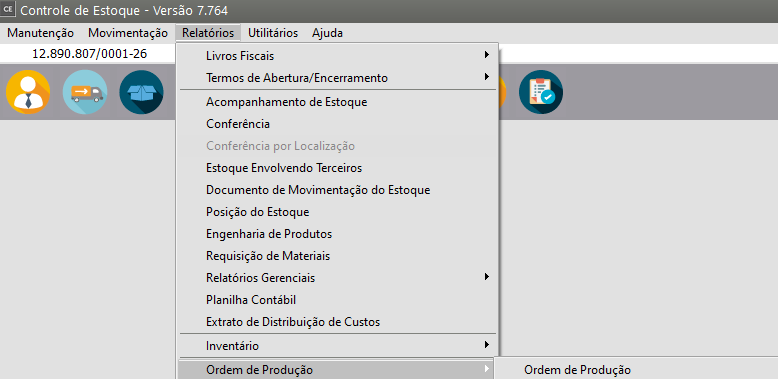
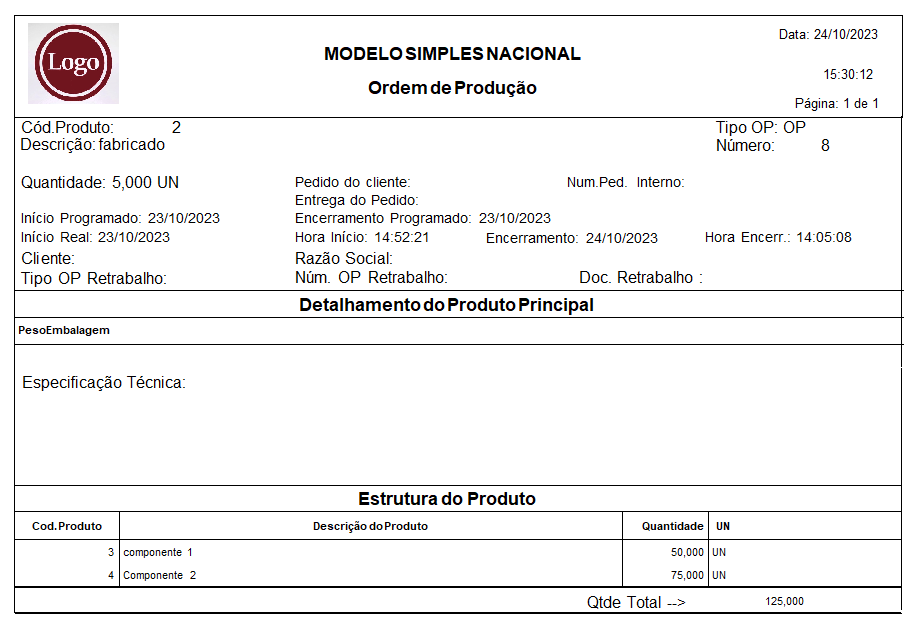
Este relatório está acessível através do menu **Relatórios/Ordem de Produção/Ordem de Produção**.
[](https://autoatendimento.grupoallegus.com.br/uploads/images/gallery/2023-10/gpuimage.png)
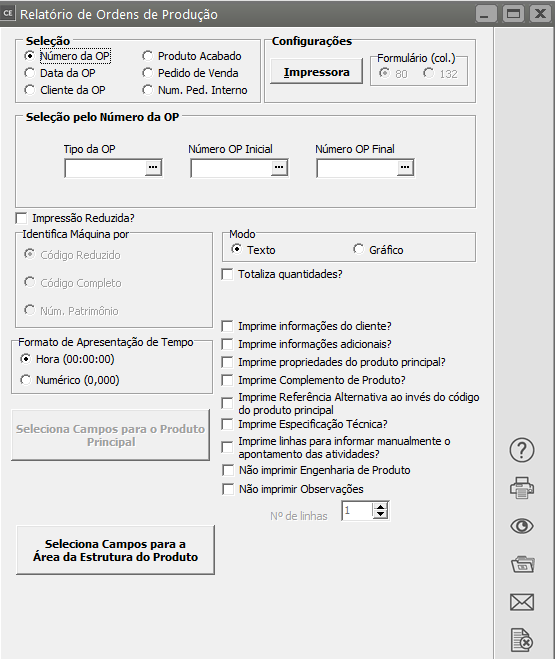
Ele proporcionará a impressão das [ordens de produção](https://autoatendimento.grupoallegus.com.br/books/ce/page/cadastrando-ordens-de-producao) especificadas na **faixa de seleção**, juntamente com as [estruturas](https://autoatendimento.grupoallegus.com.br/books/ce/page/cadastrando-engenharia-do-produto) e [atividades](https://autoatendimento.grupoallegus.com.br/books/ce/page/cadastrando-atividades) padrões.
[](https://autoatendimento.grupoallegus.com.br/uploads/images/gallery/2023-10/Z5wuRHimage.png)
A seleção pode ser pelo:
- **Número da OP,**
- **Data da OP**
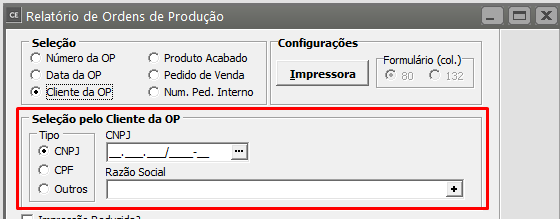
- **Cliente**
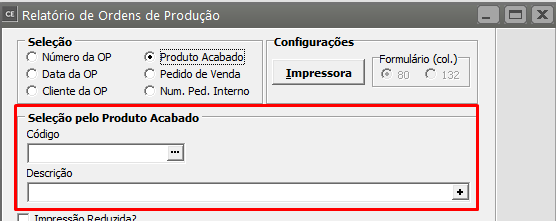
- **Produto Acabado**.
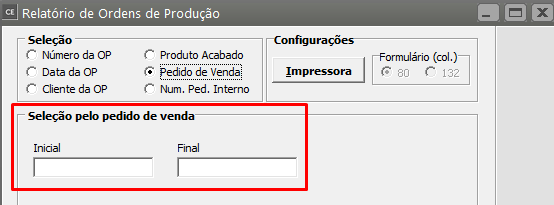
- Pedido de Venda
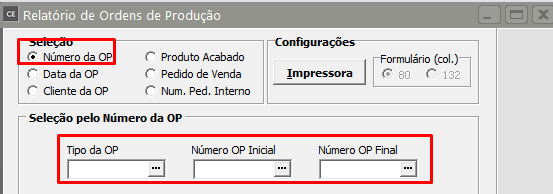
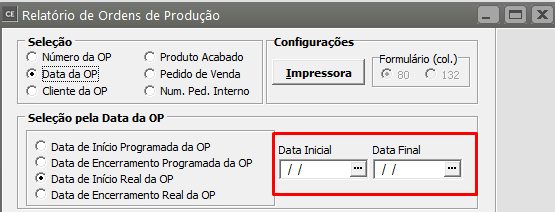
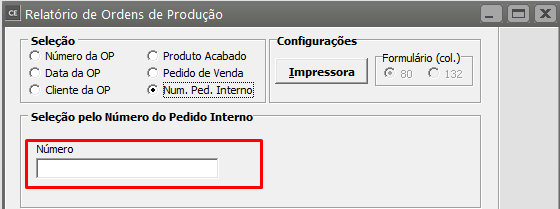
- Número do Pedido Internoa) No primeiro caso, você deverá informar a faixa de [ordens de produção](https://autoatendimento.grupoallegus.com.br/books/ce/page/cadastrando-ordens-de-producao) que deseja imprimir.b) No segundo, o período de referência deve ser informado e este pode ser pela
- **Data de Início Programada**,
- **Data de Encerramento Programada**,
- **Data de Início Real** ou pela
- **Data de Encerramento Real da OP**.c) Na seleção por[ cliente](https://autoatendimento.grupoallegus.com.br/books/ce/page/cadastrando-clientes) ou [produto](https://autoatendimento.grupoallegus.com.br/books/ce/page/cadastrando-os-produtos) deve ser informado um Conteúdo específico para a impressão,d) na seleção [pedido de venda](https://autoatendimento.grupoallegus.com.br/books/vdne/page/cadastrando-pedidos), deverá ser informado a faixa de[ pedidos de vendas](https://autoatendimento.grupoallegus.com.br/books/vdne/page/cadastrando-pedidos) e na seleção número do pedido interno, informe o número do pedido interno.
[](https://autoatendimento.grupoallegus.com.br/uploads/images/gallery/2023-10/yeEimage.png)
[](https://autoatendimento.grupoallegus.com.br/uploads/images/gallery/2023-10/5RAimage.png)
[](https://autoatendimento.grupoallegus.com.br/uploads/images/gallery/2023-10/chQimage.png)
[](https://autoatendimento.grupoallegus.com.br/uploads/images/gallery/2023-10/JjUimage.png)
[](https://autoatendimento.grupoallegus.com.br/uploads/images/gallery/2023-10/wijimage.png)
[](https://autoatendimento.grupoallegus.com.br/uploads/images/gallery/2023-10/91Mimage.png)
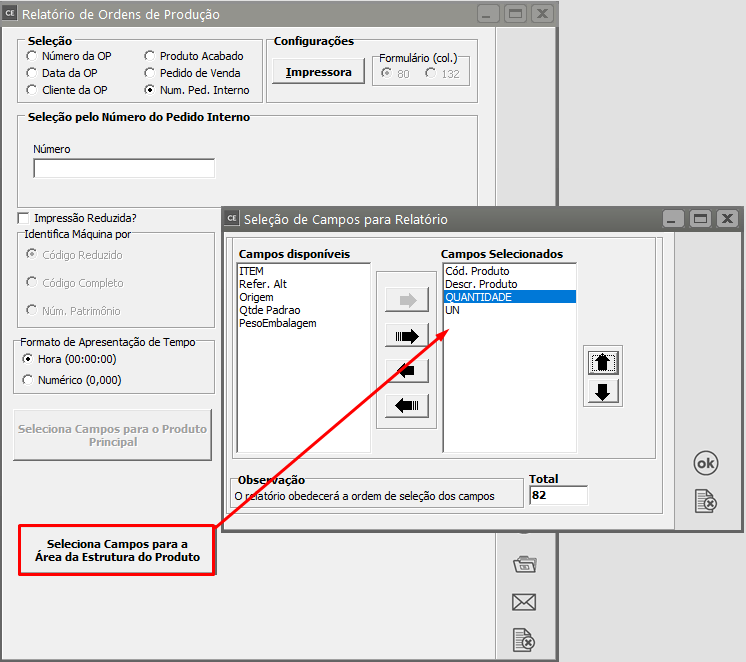
Este relatório disponibiliza a **Seleção de Campos** para a área da **Estrutura Padrão da OP.**
[](https://autoatendimento.grupoallegus.com.br/uploads/images/gallery/2023-10/dZlimage.png)
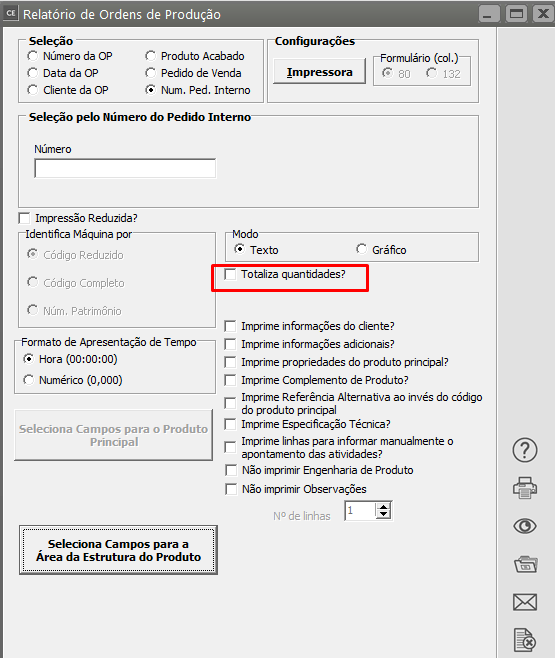
A caixa **Identifica Máquina por** só estará disponível se o **Sistema de Planejamento e Controle de produção** e a empresa estiver inicializada nele.A opção **Totaliza quantidades** deverá ser assinalada se você desejar que seja impresso um somatório das colunas referentes a quantidades ao final do relatório.
[](https://autoatendimento.grupoallegus.com.br/uploads/images/gallery/2023-10/xgX75Himage.png)
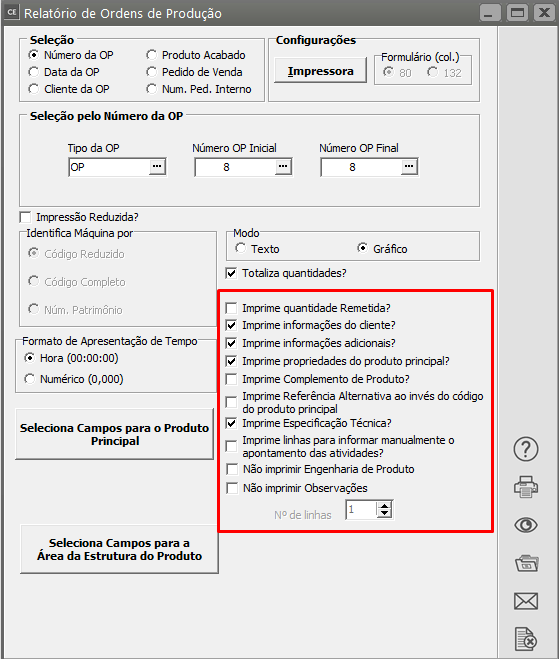
Além dessas opções você poderá definir também:
- Imprime informações do [cliente](https://autoatendimento.grupoallegus.com.br/books/ce/page/cadastrando-clientes)
- Imprime informações dicionais
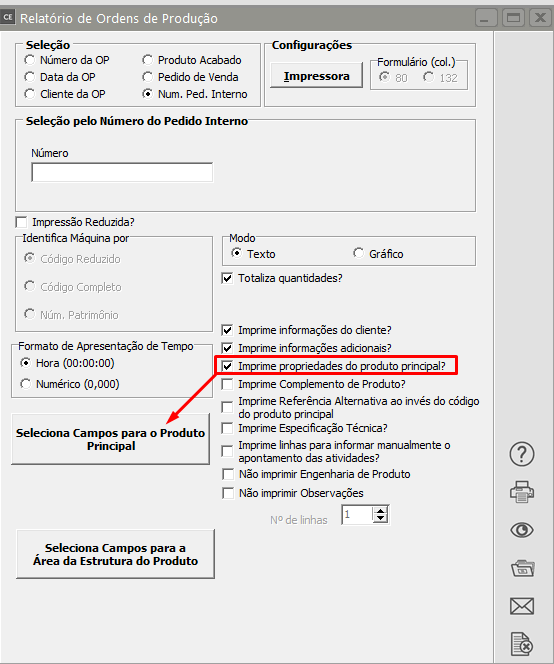
- Imprime propriedades do [produto](https://autoatendimento.grupoallegus.com.br/books/ce/page/cadastrando-os-produtos) principalQuando essa seleção é feita, o sistema habilita o botão para **Seleção dos Campos para o Produto Principal**
[](https://autoatendimento.grupoallegus.com.br/uploads/images/gallery/2023-10/zPzimage.png)
- Imprime Complemento de Produto
- Imprime Referência Alternativa ao invés do código do produto principal
- Imprime Especificação Técnica
- Imprime linhas para informar manualmente o apontamento das atividades
- Não imprimir Engenharia de Produto
- Não imprimir Observações
[](https://autoatendimento.grupoallegus.com.br/uploads/images/gallery/2023-10/JP3image.png)
[](https://autoatendimento.grupoallegus.com.br/uploads/images/gallery/2023-10/R7simage.png)
**Veja também os Itens:**
- [Cadastrando Tipos de Ordem de Produção/Serviços](https://autoatendimento.grupoallegus.com.br/books/ce/page/cadastrando-situacoes-da-ordens-de-producao)
- [Cadastrando Ordens de Produção](https://autoatendimento.grupoallegus.com.br/books/ce/page/cadastrando-ordens-de-producao)
- [Requisitando Materiais para Ordens de produção/serviços](https://autoatendimento.grupoallegus.com.br/books/ce/page/requisitando-materiais-para-ordens-de-producaoservicos)
- [Cadastrando Situações da Ordem de Produção](https://autoatendimento.grupoallegus.com.br/books/ce/page/cadastrando-situacoes-da-ordens-de-producao)
- [Cadastrando Engenharia de Produto](https://autoatendimento.grupoallegus.com.br/books/ce/page/cadastrando-engenharia-do-produto)
- [Agregando Custo às Ordens de Produção](https://autoatendimento.grupoallegus.com.br/books/ce/page/agregando-custo-as-ordens-de-producao)
- [Realizando Apontamento de Mão de Obra Direta](https://autoatendimento.grupoallegus.com.br/books/ce/page/realizando-apontamento-de-mao-de-obra-direta)
- [Encerramento de Ordens de Produção](https://autoatendimento.grupoallegus.com.br/books/ce/page/cadastro-de-encerramento-de-ordem-de-producao)
- [Emitindo Relatório de Engenharia de Produtos](https://autoatendimento.grupoallegus.com.br/books/ce/page/emitindo-relatorio-de-engenharia-de-produtos)
- [Emitindo Relatórios de Ordem de Produção](https://autoatendimento.grupoallegus.com.br/books/ce/page/emitindo-relatorios-de-ordem-de-producao)
- [Relatório de Acompanhamento de Ordem de Produção](https://autoatendimento.grupoallegus.com.br/books/ce/page/relatorio-de-acompanhamento-de-ordem-de-producao)
- [Emitindo Relatório de Extrato de Ordem de Produção](https://autoatendimento.grupoallegus.com.br/books/ce/page/emitindo-relatorio-de-extrato-de-ordem-de-producao)
- [Geração de Ordem de Encomenda Automaticamente ao cadastrar o Pedido (Produto sob encomenda)](https://autoatendimento.grupoallegus.com.br/books/ce/page/geracao-de-ordem-de-encomenda-automaticamente-ao-cadastrar-o-pedido-sem-utilizacao-de-estoque-de-terceiros)
- [Beneficiamento Interno (Industrialização Sob Encomenda)](https://autoatendimento.grupoallegus.com.br/books/ce/page/beneficiamento-interno-industrializacao-sob-encomenda-com-estoque-de-terceiros)