# Cadastrando Turnos
****
Essa tabela identifica o horário contratual do [técnico/operador](https://autoatendimento.grupoallegus.com.br/books/ce/page/cadastrando-tecnicos-e-operadores) e deverá ser informado no menu **Manutenção>Tabelas>Ordem de Produção>Turno**
[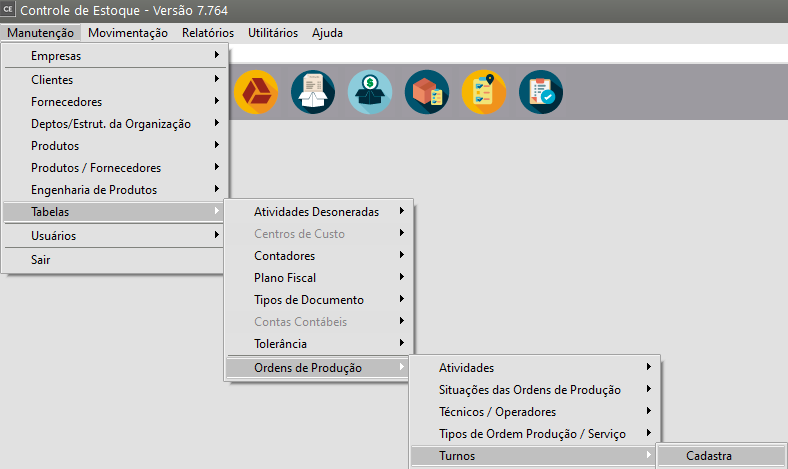](https://autoatendimento.grupoallegus.com.br/uploads/images/gallery/2023-10/QP0image.png)
A tabela de **Turno** deverá ser criada por [empresa](https://autoatendimento.grupoallegus.com.br/books/ce/page/cadastrando-empresa).
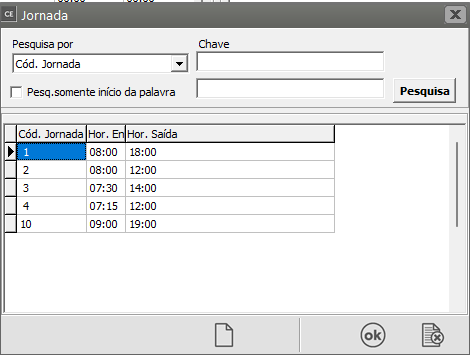
Para o cadastro do **turno** será necessário primeiro criar a [JORNADA](https://autoatendimento.grupoallegus.com.br/books/fp/page/cadastrando-jornada-kES). Veja item [Cadastrando Jornada.](https://autoatendimento.grupoallegus.com.br/books/fp/page/cadastrando-jornada-kES)
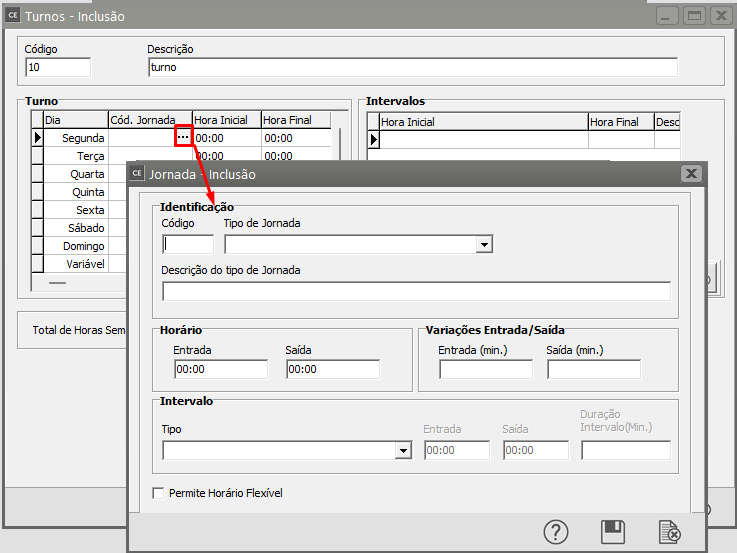
Para que você consiga cadastrar a [jornada](https://autoatendimento.grupoallegus.com.br/books/fp/page/cadastrando-jornada-kES), acesse o **DLG (três pontinhos) da coluna [Código Jornada](https://autoatendimento.grupoallegus.com.br/books/fp/page/cadastrando-jornada-kES)**
[](https://autoatendimento.grupoallegus.com.br/uploads/images/gallery/2023-10/q4qimage.png)
Em seguida defina:
- o código e
- descrição da jornada,
- a Descrição do Tipo de Jornada,
- o horário de entrada e saída,
- a quantidade de minutos de tolerância para entrada e saída,
- o tipo de intervalo
[](https://autoatendimento.grupoallegus.com.br/uploads/images/gallery/2023-10/jTJimage.png)
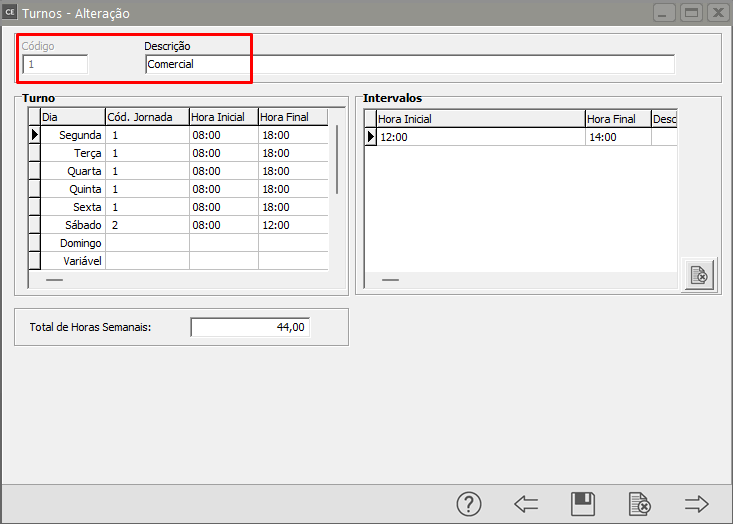
Depois de [cadastrar a jornada](https://autoatendimento.grupoallegus.com.br/books/fp/page/cadastrando-jornada-kES), volte para a tabela de **cadastro do turno**, nesta tabela deverá ser informado um **código e a descrição que identifique esse horário.**
[](https://autoatendimento.grupoallegus.com.br/uploads/images/gallery/2023-10/8Wbimage.png)
Em seguida preencher apenas o **TURNO**:
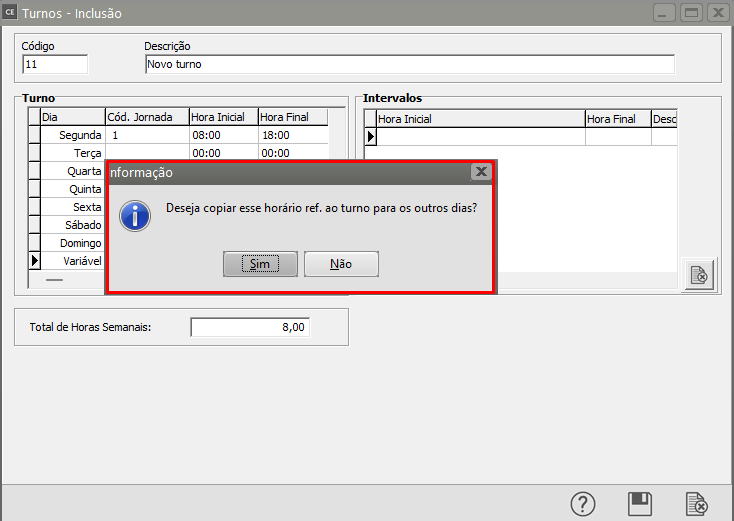
\- Na grade de **TURNO**, você deverá informar o [CÓDIGO DA JORNADA](https://autoatendimento.grupoallegus.com.br/books/fp/page/cadastrando-jornada-kES) e ao informar a [jornada](https://autoatendimento.grupoallegus.com.br/books/fp/page/cadastrando-jornada-kES) para o primeiro dia da semana, o sistema questionará se você deseja repetir o horário informado para todos os outros dias ou então poderá ser informado mais de um código de jornada na semana, caso o funcionário tenha horários diferentes
[](https://autoatendimento.grupoallegus.com.br/uploads/images/gallery/2023-10/2Skimage.png)
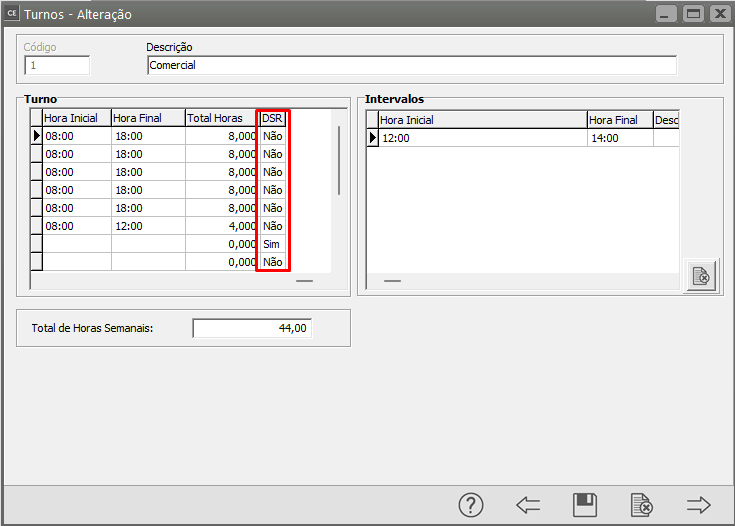
- na coluna DSR informar **SIM ou NÃO** para cada dia.
[](https://autoatendimento.grupoallegus.com.br/uploads/images/gallery/2023-10/h6kimage.png)
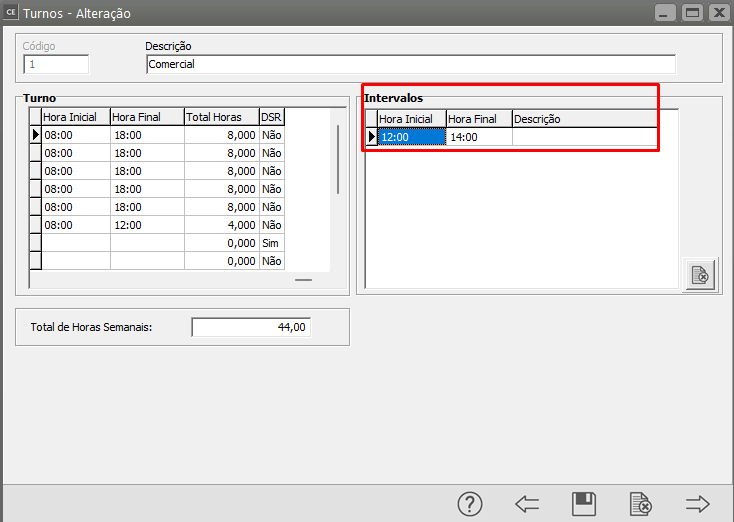
- O campo Intervalo será preenchido conforme o intervalo cadastrado no [código da jornada](https://autoatendimento.grupoallegus.com.br/books/fp/page/cadastrando-jornada-kES) e o sistema calculará o Total de Horas Semanais.
[](https://autoatendimento.grupoallegus.com.br/uploads/images/gallery/2023-10/WRuimage.png)
OBS.: Para o **Sistema de Planejamento e Controle de Produção** os campos [Código da Jornada](https://autoatendimento.grupoallegus.com.br/books/fp/page/cadastrando-jornada-kES) e **DSR** só irão aparecer quando a empresa possuir o **Sistema Folha de Pagamento** integrado na base de dados, caso contrário, estas colunas não irão aparecer.
**Veja também os Itens:**
- [Cadastrando Departamentos](https://autoatendimento.grupoallegus.com.br/books/ce/page/cadastrando-departamentos)
- [Cadastrando Atividades](https://autoatendimento.grupoallegus.com.br/books/ce/page/cadastrando-atividades)
- [Cadastrando Técnicos e Operadores](https://autoatendimento.grupoallegus.com.br/books/ce/page/cadastrando-tecnicos-e-operadores)
- [Realizando Apontamento de Mão de Obra Direta](https://autoatendimento.grupoallegus.com.br/books/ce/page/realizando-apontamento-de-mao-de-obra-direta)
- [Inventário - Contagem de Cartões](https://autoatendimento.grupoallegus.com.br/books/ce/page/inventario-contagem-de-cartoes)
- [Emitindo relatório de Apontamento de Mão de Obra Direta](https://autoatendimento.grupoallegus.com.br/books/ce/page/emitindo-relatorio-de-apontamento-de-mao-de-obra-direta)
- [Cadastrando os Contadores do Estoque Físico da Empresa](https://autoatendimento.grupoallegus.com.br/books/ce/page/cadastrando-os-contadores-do-estoque-fisico-da-empresa)