# Recalculando Saldo das Ordens de Compra (OC)
Se você verificar que o saldo das [Ordens de Compra](https://autoatendimento.grupoallegus.com.br/books/cc/page/cadastrando-ordem-de-compra-oc) não estão corretos, você poderá acessar o menu **Movimentação>Ordens de Compras>Manutenção**
[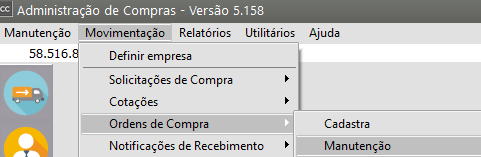](https://autoatendimento.grupoallegus.com.br/uploads/images/gallery/2024-09/uAYimage.png)
Acesse o botão **"Recalcula Saldo"** para que o saldo da ordem de compra seja **atualizado**
[](https://autoatendimento.grupoallegus.com.br/uploads/images/gallery/2023-09/JGLzkZimage.png)
Será apresentada a tela para que você defina o **número ou período** da [Ordem de Compra](https://autoatendimento.grupoallegus.com.br/books/cc/page/cadastrando-ordem-de-compra-oc) que terá o saldo atualizado
[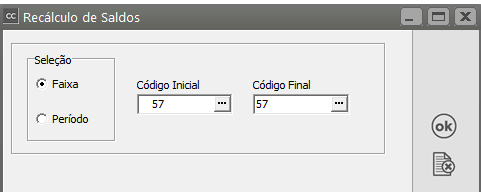](https://autoatendimento.grupoallegus.com.br/uploads/images/gallery/2023-09/gDaimage.png)
**Veja também os Itens:**
- [Emitindo Relatórios de Ordens de Compra](https://autoatendimento.grupoallegus.com.br/books/cc/page/emitindo-relatorios-de-ordens-de-compra)
- [Cadastrando Ordem de Compra](https://autoatendimento.grupoallegus.com.br/books/cc/page/cadastrando-ordem-de-compra-oc)
- [Impressão da Ordem de Compra](https://autoatendimento.grupoallegus.com.br/books/cc/page/impressao-da-ordem-de-compra)
- [Cancelando e Descancelando Ordem de Compra](https://autoatendimento.grupoallegus.com.br/books/cc/page/cancelando-e-descancelando-ordem-de-compra)