# Emitindo Relatórios Estatísticos

<span style="color: rgb(0, 0, 0); font-family: Arial; font-size: small;"><iframe allowfullscreen="allowfullscreen" height="314" src="https://www.youtube.com/embed/hmvSztR3TTc" width="560"></iframe>

</span>

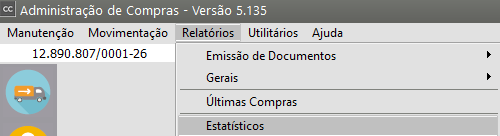
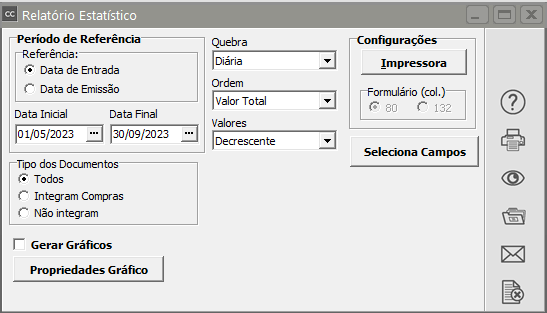
<span style="color: rgb(0, 0, 0); font-family: Arial; font-size: small;">Os relatórios estatísticos podem ser impressos através do menu **Relatórios/Estatísticos**</span>

[![image.png](https://autoatendimento.grupoallegus.com.br/uploads/images/gallery/2023-09/scaled-1680-/Eboimage.png)](https://autoatendimento.grupoallegus.com.br/uploads/images/gallery/2023-09/Eboimage.png)

<span style="color: rgb(0, 0, 0);"><span style="font-family: Arial; font-size: small;">Este relatório listará de forma sintetizada os valores de acordo com a **quebra definida**, </span></span>

- <span style="color: rgb(0, 0, 0);"><span style="font-family: Arial; font-size: small;">Produto</span></span>
- <span style="color: rgb(0, 0, 0);"><span style="font-family: Arial; font-size: small;">Fornecedor</span></span>
- <span style="color: rgb(0, 0, 0);"><span style="font-family: Arial; font-size: small;">Comprador</span></span>
- <span style="color: rgb(0, 0, 0);"><span style="font-family: Arial; font-size: small;">Código Fiscal</span></span>
- <span style="color: rgb(0, 0, 0);"><span style="font-family: Arial; font-size: small;">Diária</span></span>
- <span style="color: rgb(0, 0, 0);"><span style="font-family: Arial; font-size: small;">podendo apresentar o percentual de participação de cada quebra no total das entradas, de forma crescente ou decrescente. Os campos que serão impressos no relatório poderão ser selecionados através do botão </span></span>[![image.png](https://autoatendimento.grupoallegus.com.br/uploads/images/gallery/2023-09/scaled-1680-/cNSimage.png)](https://autoatendimento.grupoallegus.com.br/uploads/images/gallery/2023-09/cNSimage.png)

[![image.png](https://autoatendimento.grupoallegus.com.br/uploads/images/gallery/2024-09/scaled-1680-/RRQimage.png)](https://autoatendimento.grupoallegus.com.br/uploads/images/gallery/2024-09/RRQimage.png)
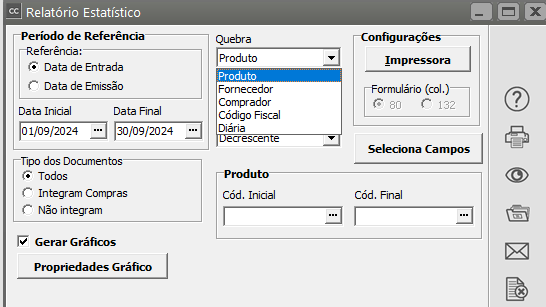
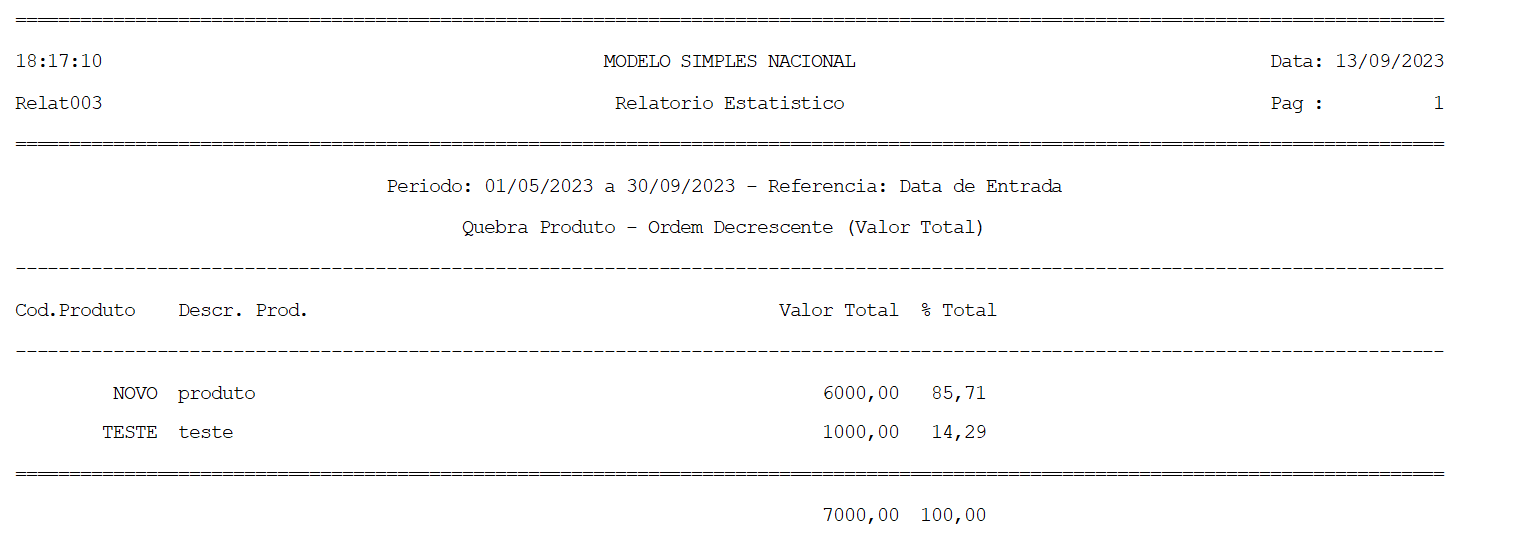
**<span style="color: rgb(0, 0, 0); font-family: Arial; font-size: small;"> Se a quebra escolhida for Produto, teremos, por exemplo:</span>**

[![image.png](https://autoatendimento.grupoallegus.com.br/uploads/images/gallery/2023-09/scaled-1680-/v97image.png)](https://autoatendimento.grupoallegus.com.br/uploads/images/gallery/2023-09/v97image.png)

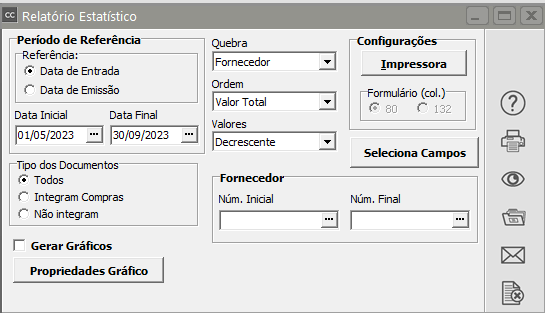
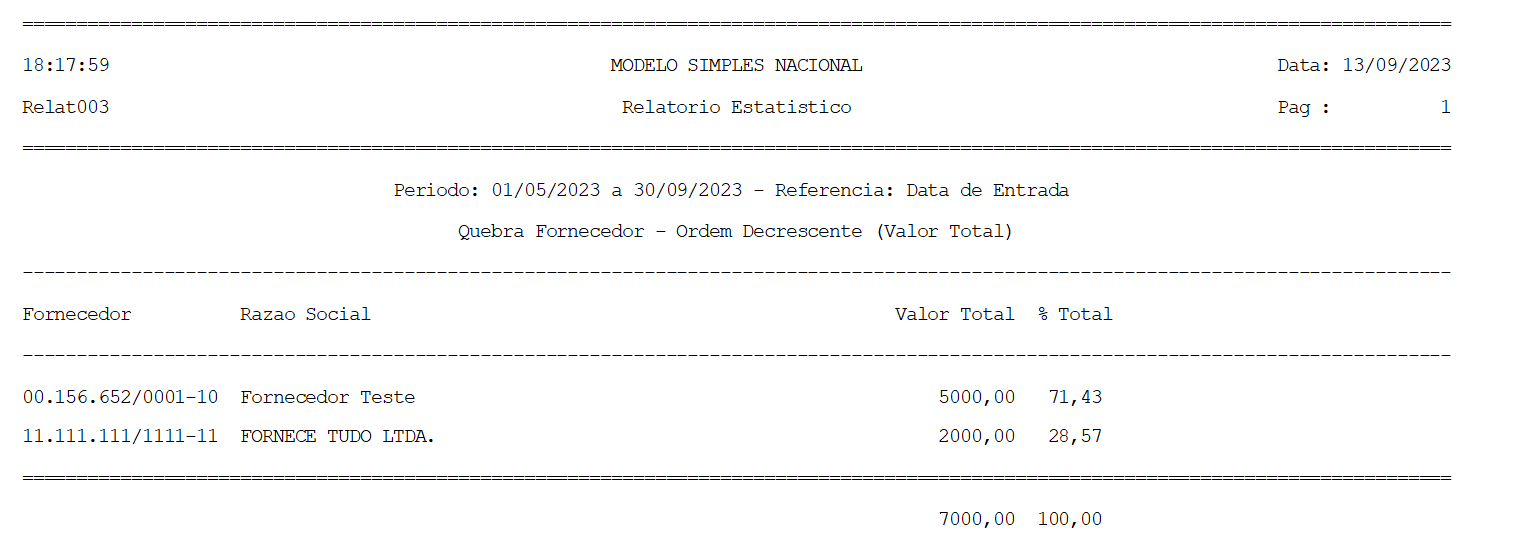
**Se a quebra escolhida for por fornecedor**

[![image.png](https://autoatendimento.grupoallegus.com.br/uploads/images/gallery/2023-09/scaled-1680-/Gnnimage.png)](https://autoatendimento.grupoallegus.com.br/uploads/images/gallery/2023-09/Gnnimage.png)
[![image.png](https://autoatendimento.grupoallegus.com.br/uploads/images/gallery/2023-09/scaled-1680-/A2Timage.png)](https://autoatendimento.grupoallegus.com.br/uploads/images/gallery/2023-09/A2Timage.png)
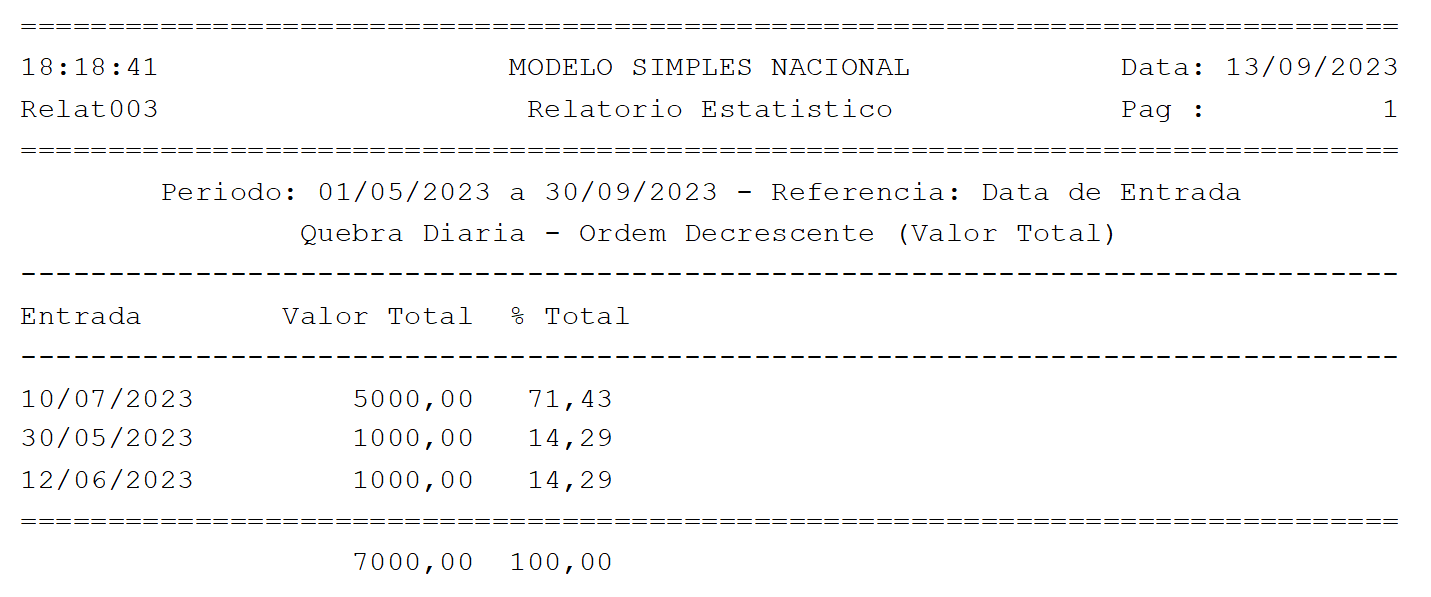
**Se a quebra definida for diária**

[![image.png](https://autoatendimento.grupoallegus.com.br/uploads/images/gallery/2023-09/scaled-1680-/6NLimage.png)](https://autoatendimento.grupoallegus.com.br/uploads/images/gallery/2023-09/6NLimage.png)
[![image.png](https://autoatendimento.grupoallegus.com.br/uploads/images/gallery/2023-09/scaled-1680-/zJ7image.png)](https://autoatendimento.grupoallegus.com.br/uploads/images/gallery/2023-09/zJ7image.png)
<span style="color: rgb(0, 0, 0); font-family: Arial, Helvetica, sans-serif; font-size: small;">**Observação:** Quando uma determinada quebra escolhida tiver participação menor que <span style="text-decoration: underline;">**1%** </span>o sistema irá agrupar os valores dessas quebras e demonstrá-lo como Outros.</span>

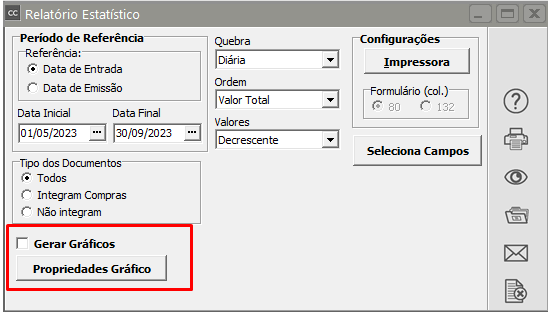
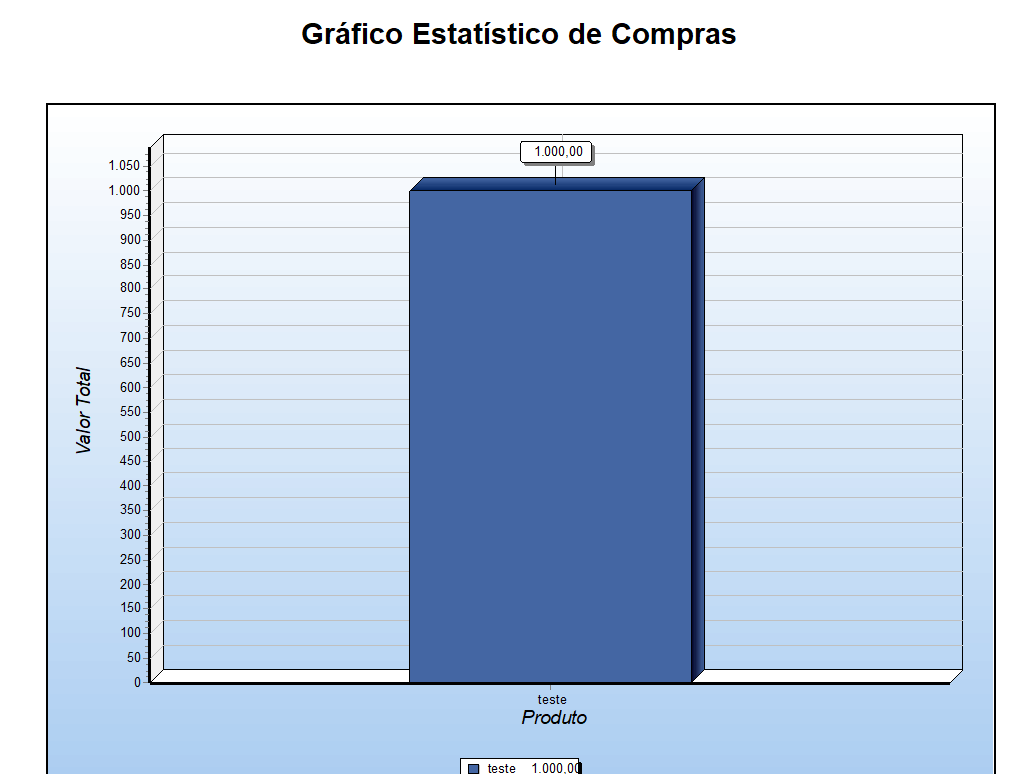
<span style="color: rgb(0, 0, 0); font-family: Arial, Helvetica, sans-serif; font-size: small;">Esse relatório poderá ser gerado em **Forma de Gráfico**, para isso selecione a opção gerar gráficos e em seguida clique no botão Propriedades Gráfico, para definir qual o formato do gráfico que você deseja gera</span>

[![image.png](https://autoatendimento.grupoallegus.com.br/uploads/images/gallery/2024-04/scaled-1680-/zsDimage.png)](https://autoatendimento.grupoallegus.com.br/uploads/images/gallery/2024-04/zsDimage.png)

[![image.png](https://autoatendimento.grupoallegus.com.br/uploads/images/gallery/2024-04/scaled-1680-/yC2image.png)](https://autoatendimento.grupoallegus.com.br/uploads/images/gallery/2024-04/yC2image.png)
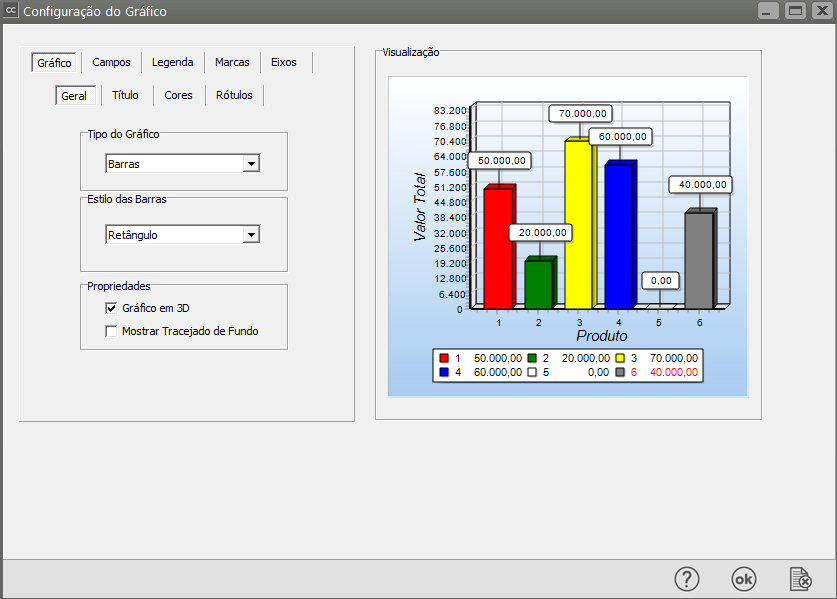
Clique para visualizar o gráfico

[![image.png](https://autoatendimento.grupoallegus.com.br/uploads/images/gallery/2024-04/scaled-1680-/1Jnimage.png)](https://autoatendimento.grupoallegus.com.br/uploads/images/gallery/2024-04/1Jnimage.png)