# Emitindo Documentos
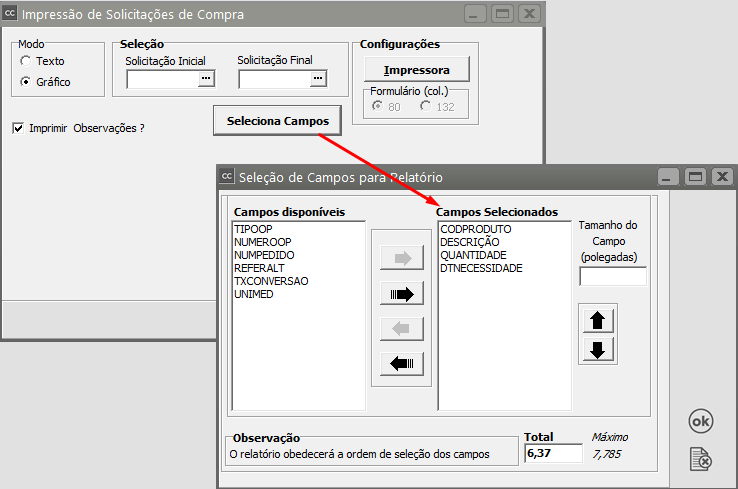
Acessando o menu **Relatórios/Emissão de Documentos** você terá a opção de **impressão dos documentos:**[](https://autoatendimento.grupoallegus.com.br/uploads/images/gallery/2023-10/Z43image.png)Para a impressão de [**Solicitações de Compra**](https://autoatendimento.grupoallegus.com.br/books/cc/page/cadastrando-solicitacoes-de-compra), [Cotações](https://autoatendimento.grupoallegus.com.br/books/cc/page/cadastrando-cotacoes) e [Ordens de Compra](https://autoatendimento.grupoallegus.com.br/books/cc/page/cadastrando-ordem-de-compra-oc), pressionando o botão [ ](https://autoatendimento.grupoallegus.com.br/uploads/images/gallery/2023-05/image-1684263503643.png) você poderá selecionar qual a faixa de documentos deseja imprimir.**1) [Solicitações de Compra:](https://autoatendimento.grupoallegus.com.br/books/cc/page/cadastrando-solicitacoes-de-compra)**Você conseguirá definir:
- se deseja o documento em **Modo Texto ou Gráfico**,
- o número inicial e final das [Solicitações de Compras](https://autoatendimento.grupoallegus.com.br/books/cc/page/cadastrando-solicitacoes-de-compra) que deseja imprimir,
- se deseja imprimir as Observações que foram incluídas em cada documento.No botão **Seleciona Campos** você conseguirá definir quais são os campos que deseja que sejam impressos no documento
[](https://autoatendimento.grupoallegus.com.br/uploads/images/gallery/2023-10/Ra9image.png)
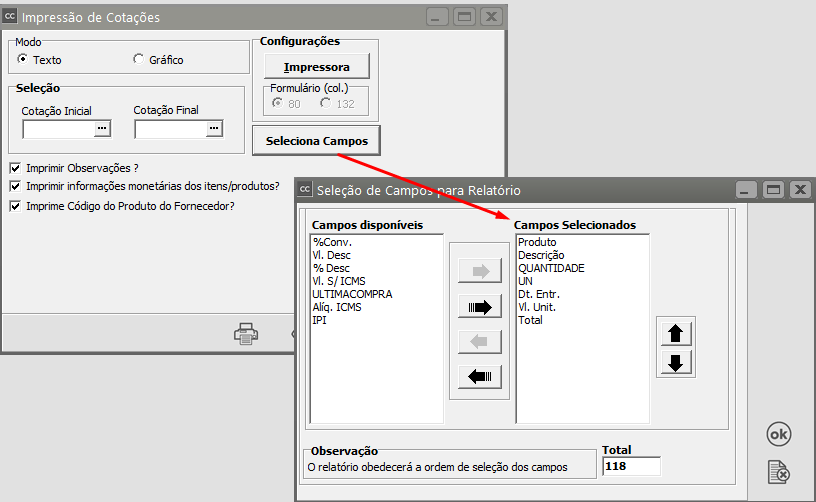
**2) [Cotações de Compra:](https://autoatendimento.grupoallegus.com.br/books/cc/page/cadastrando-cotacoes)**Defina:
- se o documento será impresso em **Modo Texto ou Gráfico**,
- qual o número inicial e final da [cotação](https://autoatendimento.grupoallegus.com.br/books/cc/page/cadastrando-cotacoes) que será impressa,
- se será impresso as observações, informações monetárias e código do produto do fornecedor.No botão **Seleciona Campos** você conseguirá definir quais os campos que deverão ser impressos.
[](https://autoatendimento.grupoallegus.com.br/uploads/images/gallery/2023-10/Zviimage.png)
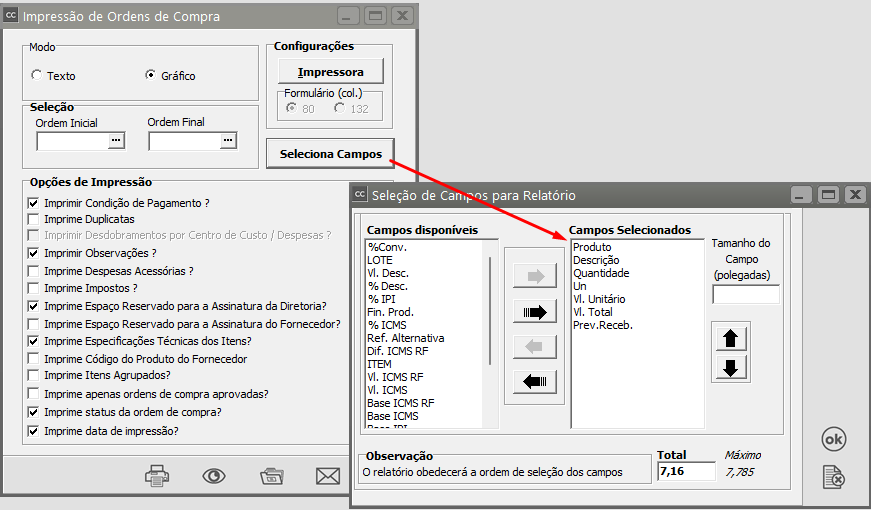
**3) [Ordens de Compra:](https://autoatendimento.grupoallegus.com.br/books/cc/page/cadastrando-ordem-de-compra-oc)**Defina:
- se a [Ordem de Compra](https://autoatendimento.grupoallegus.com.br/books/cc/page/cadastrando-ordem-de-compra-oc) será impressa em **Modo Texto ou Gráfico**,
- o número inicial e final das ordens que serão impressas e em seguida
- defina quais Opções deseja imprimirNo botão Seleciona Campos você conseguirá definir quais os campos que deverão ser impressos.
[](https://autoatendimento.grupoallegus.com.br/uploads/images/gallery/2023-10/CNaimage.png)
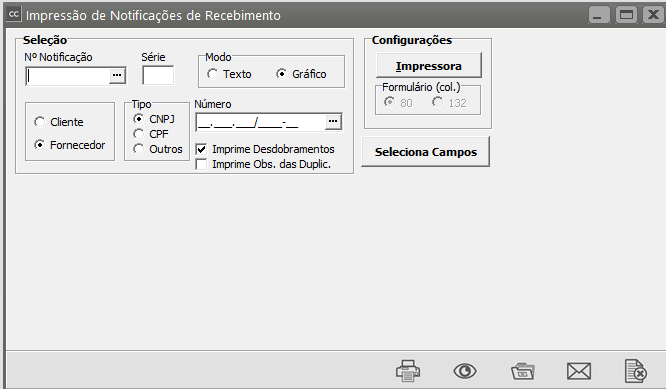
**4) [Notificações ](https://autoatendimento.grupoallegus.com.br/books/cc/page/cadastrando-notificacao-de-recebimento-nr)**[**de Recebimento:**](https://autoatendimento.grupoallegus.com.br/books/cc/page/cadastrando-notificacao-de-recebimento-nr)A emissão de [notificações de recebimento](https://autoatendimento.grupoallegus.com.br/books/cc/page/cadastrando-notificacao-de-recebimento-nr) exige que sejam informados:
- o número da [notificação de recebimento](https://autoatendimento.grupoallegus.com.br/books/cc/page/cadastrando-notificacao-de-recebimento-nr),
- o número do fornecedor (ou do cliente, no caso de devolução) e a série.A emissão de todos os documentos é disponibilizada em dois **modos: Texto e Gráfico.** a) O **modo texto** pode ser utilizado tanto em Impressoras Matriciais quanto em Impressoras Jato de Tinta ou Laser. b) O **modo gráfico** é apropriado para Impressoras Jato de Tinta ou Laser.Para a impressão de todos os documentos será possível selecionar os campos que você deseja que sejam impressos através do botão[ ](https://autoatendimento.grupoallegus.com.br/uploads/images/gallery/2023-05/image-1684263526971.png) Para maiores detalhes, veja o item [Selecionando Campos para os Relatórios](https://autoatendimento.grupoallegus.com.br/imprimindorelatorios.htm#1).A opção em **modo gráfico** disponibiliza a impressão do **logotipo da empresa,** definido na tela de cadastro da empresa [(ver item Cadastrando Empresas).](https://autoatendimento.grupoallegus.com.br/books/cc/page/cadastrando-empresas)
[](https://autoatendimento.grupoallegus.com.br/uploads/images/gallery/2023-10/OW7image.png)
**Veja também os Itens:**
- [Imprimindo Solicitação de compras](https://autoatendimento.grupoallegus.com.br/books/cc/page/imprimindo-a-solicitacao-de-compras)
- [Imprimindo Cotações](https://autoatendimento.grupoallegus.com.br/books/cc/page/imprimindo-cotacoes)
- [Relatório de Análise do Melhor Preço de Compras/Geral](https://autoatendimento.grupoallegus.com.br/books/cc/page/relatorio-de-analise-do-melhor-preco-de-comprasgeral)
- [Relatório de Análise do Melhor Preço de Compras/Comparativo](https://autoatendimento.grupoallegus.com.br/books/cc/page/relatorio-de-analise-do-melhor-preco-de-compracomparativo)
- [Imprimindo Ordem de Compra](https://autoatendimento.grupoallegus.com.br/books/cc/page/impressao-da-ordem-de-compra)
- [Imprimindo Notificação de Recebimento](https://autoatendimento.grupoallegus.com.br/books/cc/page/impressao-da-notificacao-de-recebimento)