# Desbloqueando Tabelas

<span style="color: rgb(0, 0, 0); font-family: Arial; font-size: small;"><span style="font-size: medium;"><span style="color: rgb(0, 0, 0); font-family: Arial; font-size: small;"><span style="font-size: medium;"><span style="color: rgb(0, 0, 0); font-family: Arial; font-size: small;"><iframe allowfullscreen="allowfullscreen" height="314" src="https://www.youtube.com/embed/evT0_gEqTKo" width="560"></iframe>

</span></span></span></span></span>

<span style="color: rgb(0, 0, 0); font-family: Arial; font-size: small;"><span style="font-size: medium;"><span style="color: rgb(0, 0, 0); font-family: Arial; font-size: small;"><span style="font-size: medium;"><span style="color: rgb(0, 0, 0); font-family: Arial; font-size: small;">Alguns processos do Sistema podem fazer com que as tabelas fiquem bloqueadas. É o caso, por exemplo, das transferências de dados para o Sistema de Controle de Estoque, Sistema Financeiro, Sistema Livros Fiscais ou Sistema de Contabilidade. Durante cada um desses processos, a tabela ficará bloqueada para alterações, sendo desbloqueada no final do processo. Caso ocorra algum erro durante a execução, ela poderá permanecer bloqueada, ou seja, o acesso para inclusão ou envio de informações não será permitido.</span></span></span></span></span>

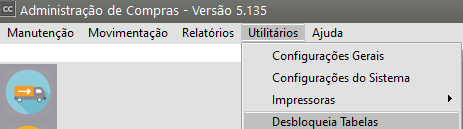
<span style="color: rgb(0, 0, 0); font-family: Arial; font-size: small;"><span style="font-size: medium;">Para desbloquear tabelas, acesse o menu **Utilitários&gt;Desbloqueia Tabelas**</span></span>

[![image.png](https://autoatendimento.grupoallegus.com.br/uploads/images/gallery/2023-09/scaled-1680-/zCnimage.png)](https://autoatendimento.grupoallegus.com.br/uploads/images/gallery/2023-09/zCnimage.png)

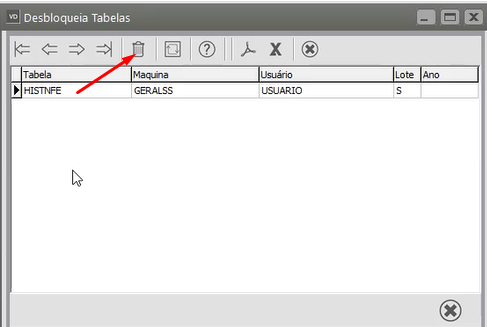
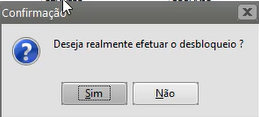
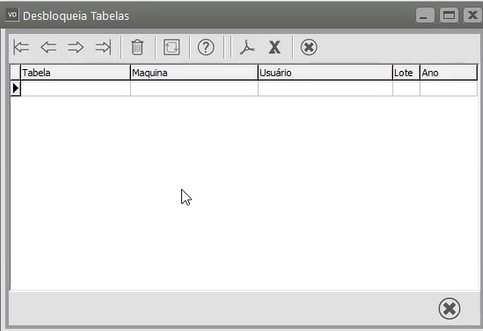
<span style="color: rgb(0, 0, 0); font-family: Arial; font-size: small;"><span style="font-size: medium;"><span style="color: rgb(0, 0, 0); font-family: Arial; font-size: small;">Informe a tabela que você deseja desbloquear e, se for o caso, o ano. Clique no botão **OK** e a tabela será desbloqueada.</span></span></span>

[![image.png](https://autoatendimento.supersoft.com.br/uploads/images/supersoft/gallery/2025-03/scaled-1680-/e0gimage.png)](https://autoatendimento.supersoft.com.br/uploads/images/supersoft/gallery/2025-03/e0gimage.png)

[![image.png](https://autoatendimento.supersoft.com.br/uploads/images/supersoft/gallery/2025-03/scaled-1680-/Ibnimage.png)](https://autoatendimento.supersoft.com.br/uploads/images/supersoft/gallery/2025-03/Ibnimage.png)
[![image.png](https://autoatendimento.supersoft.com.br/uploads/images/supersoft/gallery/2025-03/scaled-1680-/KJaimage.png)](https://autoatendimento.supersoft.com.br/uploads/images/supersoft/gallery/2025-03/KJaimage.png)
<span style="color: rgb(0, 0, 0); font-family: Arial; font-size: small;">  
  
  
</span>