# Configurando o Sistema

<span style="color: rgb(0, 0, 0); font-family: Arial; font-size: small;"><iframe allowfullscreen="allowfullscreen" height="314" src="https://www.youtube.com/embed/LIsVLwrlmAI" width="560"></iframe>

</span>

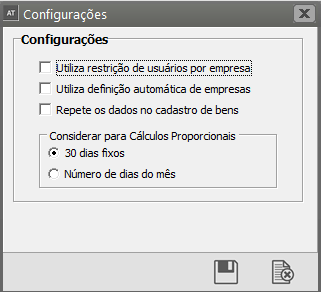
<span style="color: rgb(0, 0, 0); font-family: Arial; font-size: small;">Nas **configurações do Sistema,** você definirá o funcionamento do sistema com relação a diversos aspectos. Essas informações serão válidas para t**odas as suas empresas**. Para isso, entre no menu <span style="text-decoration: underline;">**Utilitários/Configurações.**</span></span>

[![image.png](https://autoatendimento.grupoallegus.com.br/uploads/images/gallery/2023-08/scaled-1680-/74yimage.png)](https://autoatendimento.grupoallegus.com.br/uploads/images/gallery/2023-08/74yimage.png)

<span style="color: rgb(0, 0, 0); font-family: Arial; font-size: small;">As seguintes opções estarão disponíveis:</span>

<span style="color: rgb(0, 0, 0); font-family: Arial; font-size: small;">**Utiliza restrição de usuário por empresa:** Essa configuração permite determinar a cada usuário a empresa a qual terá acesso. Veja mais informações em [Controlando Usuários do Sistema.](https://autoatendimento.grupoallegus.com.br/books/at/page/controlando-os-usuarios-do-sistema)</span>

<span style="color: rgb(0, 0, 0); font-family: Arial; font-size: small;">[![image.png](https://autoatendimento.grupoallegus.com.br/uploads/images/gallery/2023-08/scaled-1680-/hXuimage.png)](https://autoatendimento.grupoallegus.com.br/uploads/images/gallery/2023-08/hXuimage.png)</span>

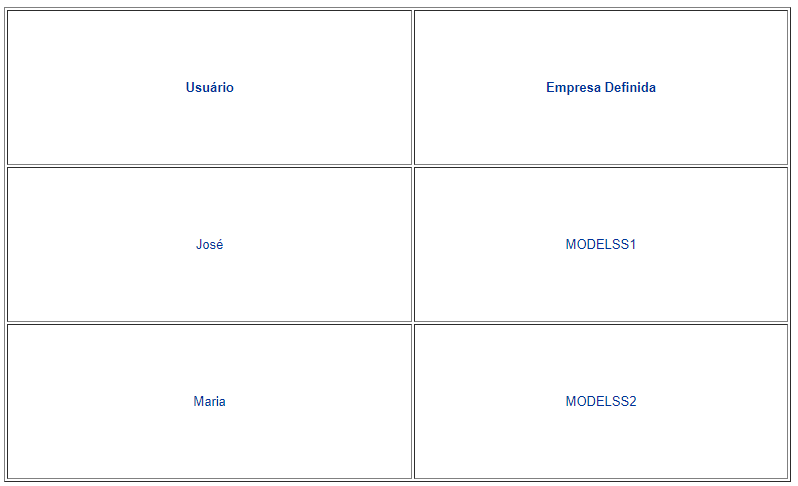
<span style="color: rgb(0, 0, 0); font-family: Arial; font-size: small;">**Utiliza definição automática de empresas:** Se essa opção estiver assinalada, quando você inicializar o sistema, a empresa que você estava utilizando da última vez será definida automaticamente, de acordo com o usuário. Por exemplo:</span><span style="color: rgb(0, 0, 0);"> </span><span style="color: rgb(0, 0, 0);"> </span>

<span style="color: rgb(0, 0, 0); font-family: Arial; font-size: small;">Quando Maria entrar no sistema, a empresa **MODELSS2** será definida automaticamente. Quando José entrar, será a **MODELSS1**.</span>

<span style="color: rgb(0, 0, 0); font-family: Arial; font-size: small;">Caso essa opção não esteja assinalada, ao entrar no sistema eles deverão **definir a empresa a ser utilizada manualmente.**</span>

<span style="color: rgb(0, 0, 0);">[![image.png](https://autoatendimento.grupoallegus.com.br/uploads/images/gallery/2023-08/scaled-1680-/aMDimage.png)](https://autoatendimento.grupoallegus.com.br/uploads/images/gallery/2023-08/aMDimage.png)</span>

<span style="color: rgb(0, 0, 0);">**<span style="font-family: Arial; font-size: small;">Repete os Dados no Cadastro de Bens</span>**<span style="font-family: Arial; font-size: small;">: Isto indica que, quando os bens forem cadastrados em seqüência, a janela de cadastro de bens repetirá automaticamente os dados do último bem cadastrado com o objetivo de facilitar a digitação. Todos os campos das abas Identificação do Bem e Informações Contábeis serão repetidos podendo ser editados até o momento da gravação</span></span>

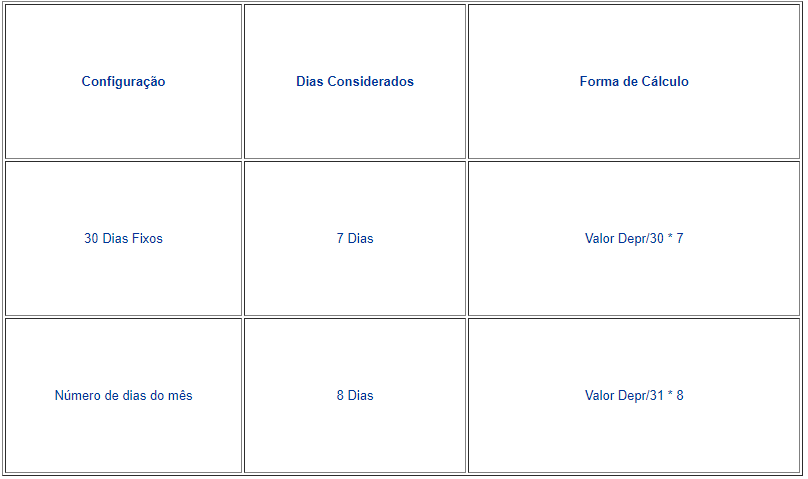
<span style="color: rgb(0, 0, 0); font-family: Arial; font-size: small;">**Considerar para cálculos proporcionais:** Permite que seja definido se o sistema irá considerar **30 Dias Fixos** ou **Número de dias do mês** no momento de efetuar o cálculo de depreciação proporcional. Por exemplo, se um bem foi adquirido dia 23/05, e durante o cadastro foi definido que ele depreciará proporcionalmente neste mês. O cálculo seria efetuado da seguinte forma:</span>

[<span style="color: rgb(0, 0, 0); font-family: Arial; font-size: small;">Para saber mais sobre Dias de cálculo, acesse o link</span>](https://autoatendimento.grupoallegus.com.br/books/at/page/definicao-da-quantidade-de-dias-no-mes-no-calculo-da-depreciacao)

[![image.png](https://autoatendimento.grupoallegus.com.br/uploads/images/gallery/2023-08/scaled-1680-/gjAimage.png)](https://autoatendimento.grupoallegus.com.br/uploads/images/gallery/2023-08/gjAimage.png)
<span style="color: rgb(0, 0, 0);"> </span>

<span style="color: rgb(0, 0, 0);"> </span>

<span style="color: rgb(0, 0, 0);"> </span>

<span style="color: rgb(0, 0, 0);"> </span>

<span style="color: rgb(0, 0, 0);"> </span>

<span style="color: rgb(0, 0, 0);"> </span>

<span style="color: rgb(0, 0, 0);"> </span>

<span style="color: rgb(0, 0, 0);"> </span>

<span style="color: rgb(0, 0, 0);"> </span>

<span style="color: rgb(0, 0, 0);"> </span>

<span style="color: rgb(0, 0, 0);"> </span>

<span style="color: rgb(0, 0, 0);"> </span>

<span style="color: rgb(0, 0, 0);"> </span>

<span style="color: rgb(0, 0, 0);"> </span>