# Visualizando os Acessos aos Sistemas neste momento
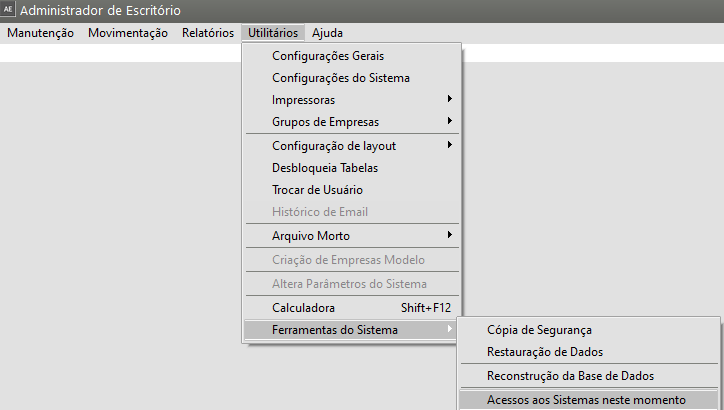
Acessando o menu **Utilitários/Ferramentas do Sistema/Acessos aos Sistemas neste momento**
[](https://autoatendimento.grupoallegus.com.br/uploads/images/gallery/2023-08/x8Jimage.png)
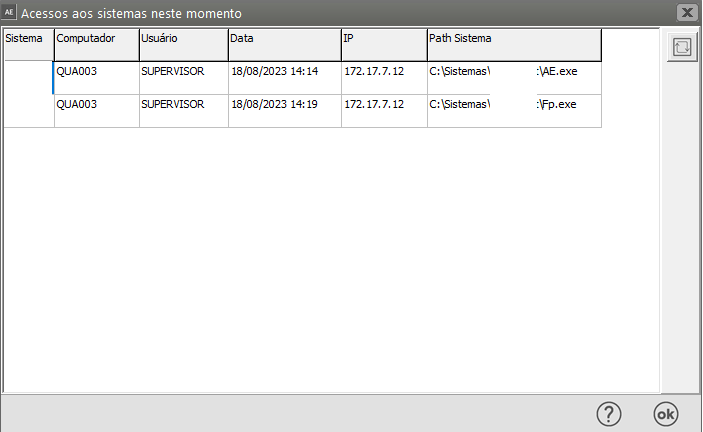
Você poderá visualizar todos os acessos aos sistemas que estão sendo realizados no momento, permitindo a verificação de quem está acessando, de qual máquina e a qual sistema.
[](https://autoatendimento.grupoallegus.com.br/uploads/images/gallery/2023-08/BiSimage.png)
É importante saber que você somente conseguirá fazer uma **Cópia de Segurança**, uma **Restauração de Dados** ou mesmo a **Criação das Empresas Modelo** se nenhuma outra pessoa estiver acessando, no momento, qualquer Sistema.