# Cadastrando Sócios das Empresas Clientes do Escritório Contábil

<iframe allowfullscreen="allowfullscreen" height="461" src="https://www.youtube.com/embed/OjLf5Nzyi5I" style="width: 822px; height: 461px;" width="822"></iframe>

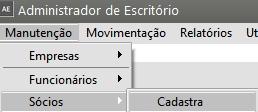
<span style="color: rgb(0, 0, 0); font-family: Arial; font-size: small;">Para cadastrar os **Sócios da Empresas Clientes do Escritório Contábil,** acesse o menu **Manutenção&gt;Sócios&gt;Cadastra**</span>

[![image.png](https://autoatendimento.grupoallegus.com.br/uploads/images/gallery/2023-08/scaled-1680-/C2oimage.png)](https://autoatendimento.grupoallegus.com.br/uploads/images/gallery/2023-08/C2oimage.png)

Quando esse menu for acessado o Sistema apresentará a Lista de **Clientes do Escritório Contábil** que já estão cadastrados no Sistema, para que você defina de qual empresa é o Sócio que será cadastrado.

[![image.png](https://autoatendimento.grupoallegus.com.br/uploads/images/gallery/2023-08/scaled-1680-/kklimage.png)](https://autoatendimento.grupoallegus.com.br/uploads/images/gallery/2023-08/kklimage.png)
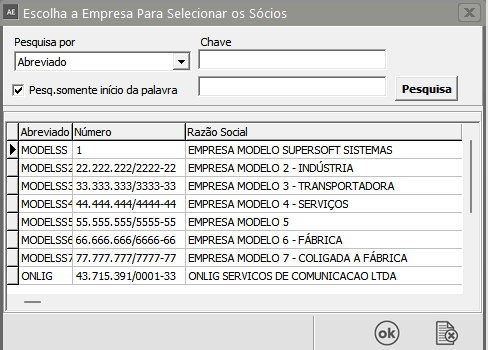
Faça a Definição e clique na Seta Avança, em seguida clique no botão novo.

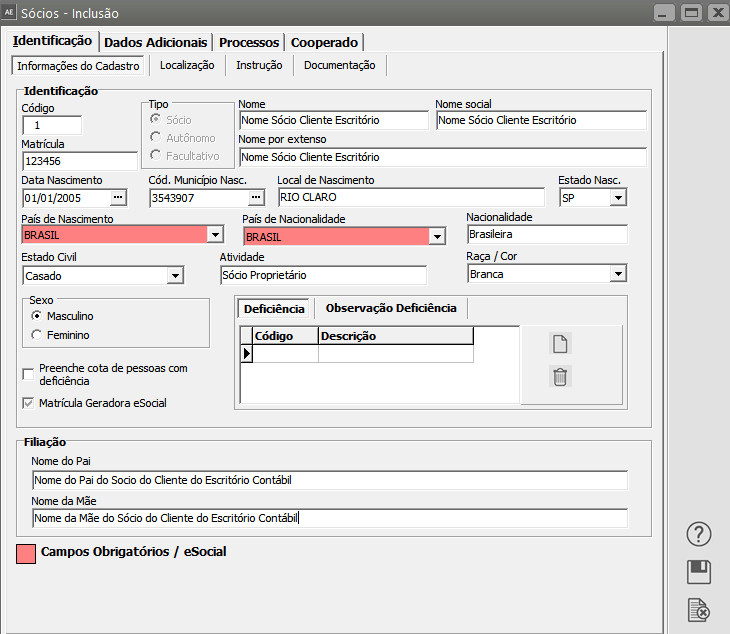
<span style="color: rgb(0, 0, 0); font-family: Arial; font-size: small;">**Aba** </span><span style="color: rgb(0, 0, 0); font-family: Arial; font-size: small;">**Identificação&gt;Informações do Cadastro** </span><span style="color: rgb(0, 0, 0);">![](https://help.supersoftservice.com.br/AE/imagens/CadastrandoSocios1.png)</span><span style="color: rgb(0, 0, 0);"><span style="font-family: Arial; font-size: small;">Complete com os dados do: sócio: </span></span>

- <span style="color: rgb(0, 0, 0);"><span style="font-family: Arial; font-size: small;">Nome, </span></span>
- <span style="color: rgb(0, 0, 0);"><span style="font-family: Arial; font-size: small;">Nome por Extenso, </span></span>
- <span style="color: rgb(0, 0, 0);"><span style="font-family: Arial; font-size: small;">dados referente a Nascimento e Nacionalidade, </span></span>
- <span style="color: rgb(0, 0, 0);"><span style="font-family: Arial; font-size: small;">estado civil, </span></span>
- <span style="color: rgb(0, 0, 0);"><span style="font-family: Arial; font-size: small;">raça, </span></span>
- <span style="color: rgb(0, 0, 0);"><span style="font-family: Arial; font-size: small;">sexo, </span></span>
- <span style="color: rgb(0, 0, 0);"><span style="font-family: Arial; font-size: small;">deficiência física e </span></span>
- <span style="color: rgb(0, 0, 0);"><span style="font-family: Arial; font-size: small;">filiação.</span></span>

<span style="color: rgb(0, 0, 0); font-family: Arial; font-size: small;">**Observação:**  
  
**Campo Atividade: Se este campo estiver preenchido e na impressão do RPA estiver marcado "Considera como Tipo de Serviço a Atividade informada no cadastro do autônomo", o sistema irá buscar esta informação para a impressão do RPA, caso este campo esteja vazio, será impresso o tipo de serviço informado no momento da impressão.**  
  
</span>

[![image.png](https://autoatendimento.grupoallegus.com.br/uploads/images/gallery/2023-08/scaled-1680-/R54image.png)](https://autoatendimento.grupoallegus.com.br/uploads/images/gallery/2023-08/R54image.png)

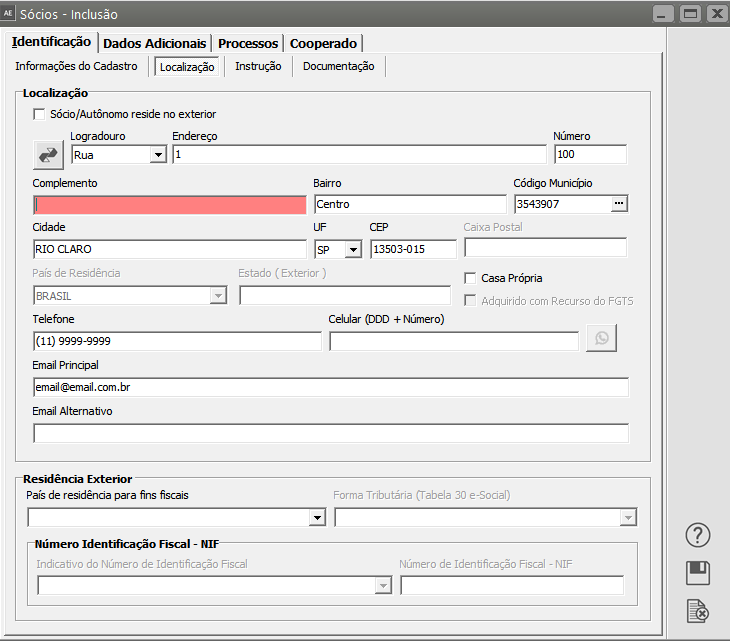
<span style="color: rgb(0, 0, 0);"><span style="font-family: Arial; font-size: small;">**Aba Identificação&gt;Localização:**</span> </span>

<span style="color: rgb(0, 0, 0);">![](https://help.supersoftservice.com.br/AE/imagens/CadastrandoSocios2.png)</span><span style="color: rgb(0, 0, 0); font-family: Arial; font-size: small;">Informe os dados referente ao endereço completo do <span style="text-decoration: underline;">**sócio / autônomo**</span>, assim como, telefones, emails e residência no exterior.</span>

[![image.png](https://autoatendimento.grupoallegus.com.br/uploads/images/gallery/2023-08/scaled-1680-/N7vimage.png)](https://autoatendimento.grupoallegus.com.br/uploads/images/gallery/2023-08/N7vimage.png)

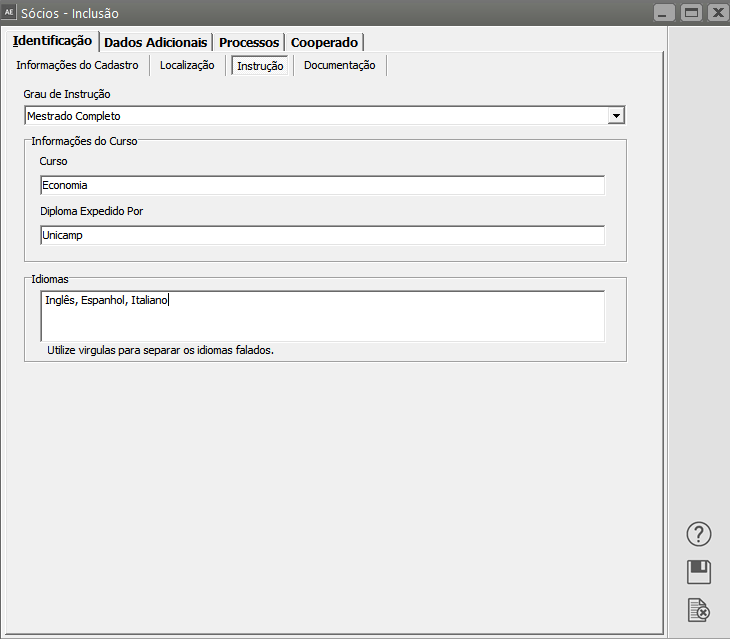
**Aba Identificação&gt;Instrução**

Informe o **Grau de Instrução**, Informações referente aos **Cursos, Diploma e Idiomas do Sócio** que está sendo cadastrado

[![image.png](https://autoatendimento.grupoallegus.com.br/uploads/images/gallery/2023-08/scaled-1680-/lRbimage.png)](https://autoatendimento.grupoallegus.com.br/uploads/images/gallery/2023-08/lRbimage.png)
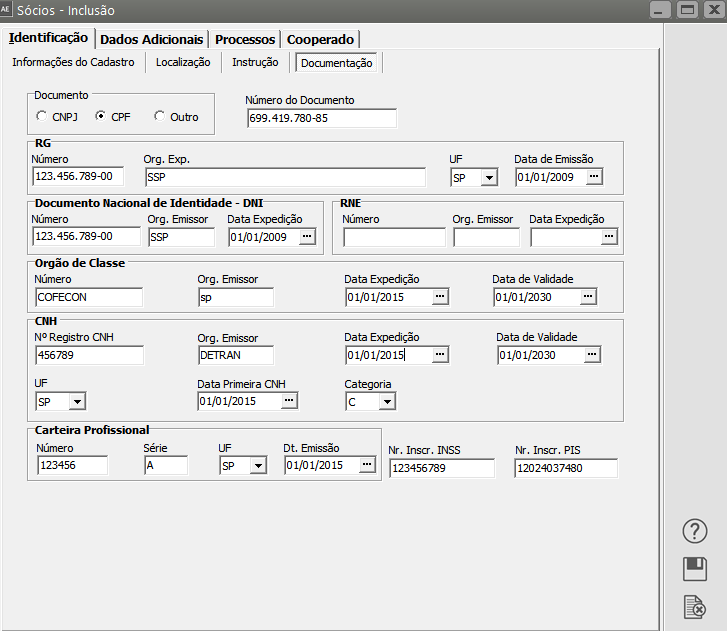
<span style="color: rgb(0, 0, 0); font-family: Arial; font-size: small;">**Aba Identificação&gt;**</span><span style="color: rgb(0, 0, 0); font-family: Arial; font-size: small;">**Documentação:**</span>

<span style="color: rgb(0, 0, 0); font-family: Arial; font-size: small;">Informe todos os números e datas de documentos do **Sócio do Cliente do Escritório Contábil**</span>

[![image.png](https://autoatendimento.grupoallegus.com.br/uploads/images/gallery/2023-08/scaled-1680-/PDrimage.png)](https://autoatendimento.grupoallegus.com.br/uploads/images/gallery/2023-08/PDrimage.png)

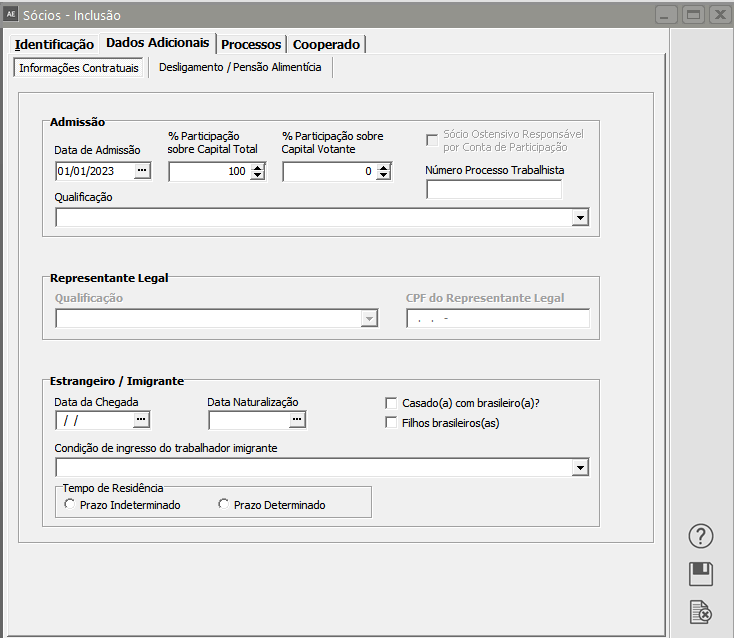
<span style="color: rgb(0, 0, 0); font-family: Arial; font-size: small;">**Aba Dados Adicionais&gt;Informações Contratuais**</span>

<span style="color: rgb(0, 0, 0); font-family: Arial; font-size: small;">**![](https://help.supersoftservice.com.br/AE/imagens/CadastrandoSociosDadosAdicionais.png)**</span><span style="color: rgb(0, 0, 0);"><span style="font-family: Arial; font-size: small;">Preencha os dados pessoais dos sócios.  
</span><span style="font-family: Arial; font-size: small;">As informações referentes a % Participação sobre Capital Total e Capital Votante, Qualificação, CPF do Representante Legal (caso sócio residente no exterior) e Qualificação do Representante Legal serão utilizados pelo Sistema Fiscal na exportação para a DIPJ.  
A opçao 'Sócio Ostensivo Responsável por Conta de Participação' será habilitado pelo sistema Folha de Pagamento, para exportação de dados para a RAIS.  
Também informe dados sobre Sócio estrangeiro.</span></span>

[![image.png](https://autoatendimento.grupoallegus.com.br/uploads/images/gallery/2023-08/scaled-1680-/KHWimage.png)](https://autoatendimento.grupoallegus.com.br/uploads/images/gallery/2023-08/KHWimage.png)

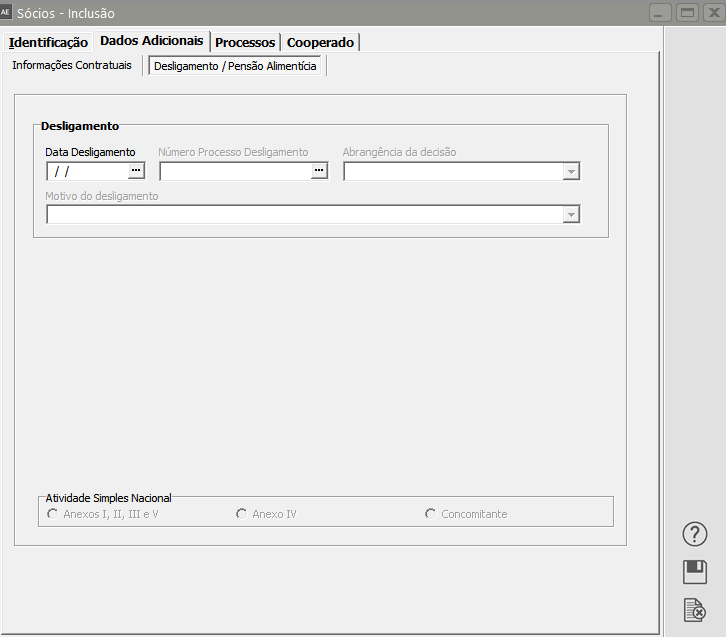
<span style="color: rgb(0, 0, 0); font-family: Arial; font-size: small;">**Aba Dados Adicionais&gt;Desligamento**</span>

<span style="color: rgb(0, 0, 0); font-family: Arial; font-size: small;">Nesta aba você irá informar a Data de Desligamento do Sócio, se houver número de processo de desligamento, abrangência da decisão e Motivo de desligamento.</span>

<span style="color: rgb(0, 0, 0); font-family: Arial; font-size: small;">Caso a empresa pertença ao **Simples Nacional**, informe o Anexo.</span>

[![image.png](https://autoatendimento.grupoallegus.com.br/uploads/images/gallery/2023-08/scaled-1680-/V7Nimage.png)](https://autoatendimento.grupoallegus.com.br/uploads/images/gallery/2023-08/V7Nimage.png)

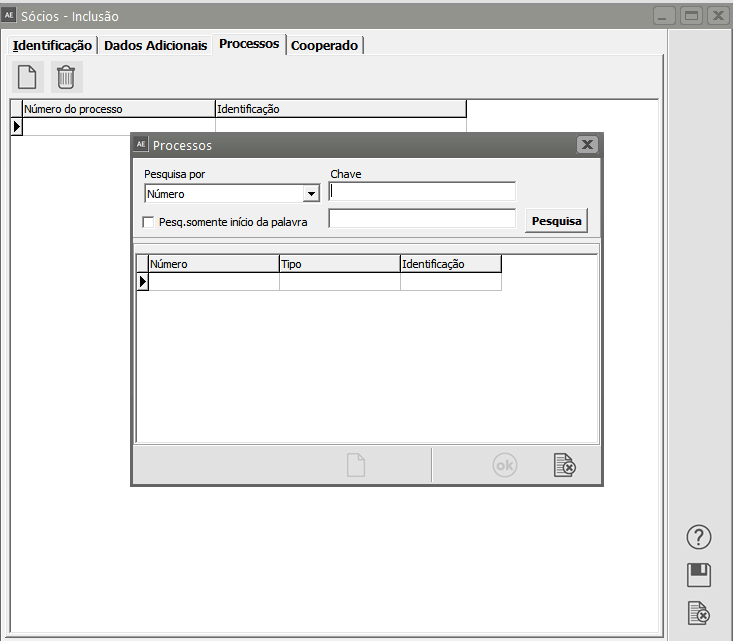
<span style="color: rgb(0, 0, 0); font-family: Arial; font-size: small;">**![](https://help.supersoftservice.com.br/AE/imagens/CadastrandoSociosOutrasInformacoes.PNG)Aba Processo**</span>

<span style="color: rgb(0, 0, 0); font-family: Arial; font-size: small;">Informe se houver algum processo vinculado a esse sócio</span>

[![image.png](https://autoatendimento.grupoallegus.com.br/uploads/images/gallery/2023-08/scaled-1680-/H5Nimage.png)](https://autoatendimento.grupoallegus.com.br/uploads/images/gallery/2023-08/H5Nimage.png)

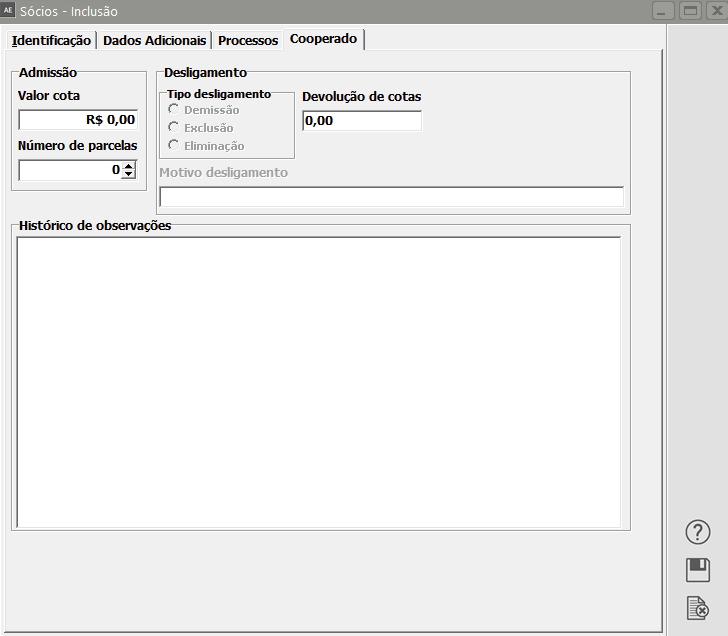
**Aba Cooperado**

Informe se o Sócio for um Cooperado:

- **Valor da Cota**
- **Número de parcelas**
- **Tipo de desligamento (se houver)**
- **Valor da Devolução de Cotas**
- **Histórico de observações**

[![image.png](https://autoatendimento.grupoallegus.com.br/uploads/images/gallery/2023-08/scaled-1680-/eVDimage.png)](https://autoatendimento.grupoallegus.com.br/uploads/images/gallery/2023-08/eVDimage.png)
**<span style="color: rgb(0, 0, 0); font-family: Arial; font-size: small;">Veja também os Itens:</span>**

- [<span style="color: rgb(0, 0, 0); font-family: Arial; font-size: small;">Cadastrando Empresas</span>](https://autoatendimento.grupoallegus.com.br/books/adecon/page/cadastrando-empresas)